Solved Teams integration issue dialling

Status
Not open for further replies.

Alphabetic

3CX MVP
Silver Partner
Advanced Certified
Joined
Jul 1, 2016
Messages
6,533
Reaction score
2,558
Hi support

I've followed the guide to set up integration but when I make a call it is prepending +44 and wont dial.

I can receive calls to teams but when I dial out it doesnt work and it's prepending +44 even to internal numbers.

1646915823878.png
 
Hi!

When you run the Teams Powershell scripts, it creates dialplans in Teams.
Generally what these dialplans do is:
  • When you dial an X digit number (3-5, denending on your setup), don't prepend anything and send it to 3CX. The number of digits matches your Extension Digit Length of your 3CX.
  • If it is a longer number, prepend the Country code, depending on the country chose in the Teams settings before running the script. The intention is to transform it into e164 format
  • Adds provision for all other 3CX Dial Codes like Paging, Pickup, Profile change, etc...
Given the description of your problem, I would guess that there is something wrong with the Dial Plan in Teams.

So, to summarize, when you dial an External Number from Teams, it should transform it into +44xxxxxxxx assuming of course you set UK as the country in the Teams settings prior to running the scripts.
For this, you need to adjust your Outbound Rules to expect number being dialed in e164 format and transform the format into what your Provider expects, e.g. "If prefix +44, strip 3 digits and prepend 0" if your provider expects numbers to be dialed in the National Format.

As for extensions, there it should not prepend +44.

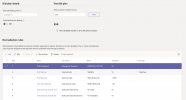
Can you login to admin.teams.microsoft.com and go to Voice --> Dial Plans and set a screenshot of what you have there?
 
Just sorting an issue with the dial pad not showing in my teams as thats disappeared now.

Should the E164 setting sort the conversion so no need for the outbound rule specifying +44?
 
1646921882053.png
 
Just sorting an issue with the dial pad not showing in my teams as thats disappeared now.

Should the E164 setting sort the conversion so no need for the outbound rule specifying +44?
I usually recommend disabling e164 from Settings --> e164 Processing as it allows for better and precise control using the Outbound Rules, especially when troubleshooting, so I would recommend you do this.

Try the above and also try dialing an Internal Extension again, as you have also made some fix for the dail pad disappearing.
 
I've stripped the 3CX stuff out of Teams admin and started again.

Just waiting for 365 to catch up so I have my dial pad back - i'll come back to you shortly.

Just on another related note which i've raised a support ticket for.

Now i've enabled Teams Integration my Yealink T54W phone doesnt ring correctly when a queue is called. If i turn it off it returns to normal.
 
Hi @NickD_3CX after reapplying licensing and stripping out the Teams config and setting it back up again i've got a working integration.

lets hope my phone behaves today too.
 
  • Like
Reactions: NickD_3CX
Hi @NickD_3CX after reapplying licensing and stripping out the Teams config and setting it back up again i've got a working integration.

lets hope my phone behaves today too.
Fingers crossed!

I'll go ahead and flag this one as 'Solved', but if anything else comes up feel free to create a new thread!
 
Status
Not open for further replies.

Members Online Now

Forum statistics

Threads
111,831
Messages
589,277
Members
164,660
Latest member
RJenkinsROCK