Teams Integration Outbound Calling

Kavin Wickham

Silver Partner
Advanced Certified
Joined
Oct 30, 2024
Messages
20
Reaction score
1
I've got a 3CX host V20 PBX with a Teams integration. Outbound calling does not work every time I attempt an outbound call i get call declined.

Inbound calling works perfectly. I believe this to be a caller ID issue but from all of the changes I've made to confirm the correct format is being out putted to the SIP trunk has resulted in the same "Call declined" when calling outbound out of Teams.

Any insight would be much appreciated! Thanks!
 
Have you setup the Office Phone as expected in O365? Also, were you using any other Teams connectors before? Even Calling Plans?
 
We have never used Teams with actual phone numbers before only internally. We have setup the O365 integration through 3CX which is working perfectly. We were not using any Teams connectors before that used direct routing or any calling plans.
 
Is the "Call declined" error seen in the event log under the dashboard, and is from the sip trunk providers ip address?
 
  • Like
Reactions: Evolute IT
No error is shown in the 3CX error log when the outbound calls through Teams is placed. Outbound calls work perfectly out of the 3CX application and inbound calls work perfectly in the 3CX application and Teams application. I simply cannot call out of the Teams application.
 
When calling out from the Teams app, are you formatting the dialed number in E164 format (+1234567890) and have an outbound rule that can route calls with this format?
 
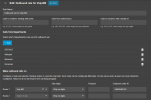
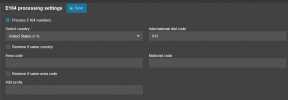
Yes Teams forces the E164 format. My outbound rule in the 3CX PBX is shown below as well as my E164 processing settings:

1747660607039.png

1747660660501.png
 
Your outbound rule only mentions the departments. Try adding a prefix of + and disabling the E164 number processing.

The frmm from he teams app the the outbound number in the international foramte to include the +
 
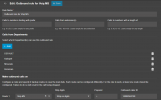
So I've adjusted the settings to this: Still getting call declined in Teams app
 

Attachments

  • 1747661211356.png
    1747661211356.png
    50.6 KB · Views: 12
Teams will send the calls to 3CX with a prepended + on the dialed number, your new rule is telling 3CX to prepend the + before sending it out the trunk.

Try putting the plus in the Calls to numbers starting with prefix instead, and then strip one digit (depending on whether your SIP trunk provider accepts numbers dialed with the prepended plus or not).

It's not clear whether calls are hitting 3CX in the first place, since you say "No error is shown in the 3CX error log when the outbound calls through Teams is placed". If you check the call log, can you see the call appearing there? If not, the issue is likely the Routing Policy on the Teams tenancy. Have you used PSTN calling on this tenancy in the past?
 
I tried your suggestion with the outbound rules and still the same result of "Call Declined".

I double checked the call policies within Teams Admin and everything is set appropriately for my user using all of the 3CX policies the initial script created. All set to top priority. But as you said I should be able to see these calls within the 3CX Call log and I cannot see them at all.
 
My SBC within Teams is showing as inactive. But when calls are made out of Teams it sees them and is recording them in it's statistics.
 
I used SSL.com which was used in 3CX's Teams Integration Documentation. Was this incorrect?
 
I used SSL.com which was used in 3CX's Teams Integration Documentation. Was this incorrect?
That’s correct. If you’re on the latest version of update 5 and using a 16sc + enterprise subscription, open a ticket with 3CX technical support to check this with you.
 
  • Like
Reactions: Evolute IT
I will go ahead and open a support ticket. Thank you all for your help!
 
  • Like
Reactions: Charles_3CX
I have exactly the same issue - was there a solution to this?
 

Latest Posts

Forum statistics

Threads
111,799
Messages
589,048
Members
164,604
Latest member
lostprey