


- Joined
- Jan 20, 2026
- Messages
- 3
- Reaction score
- 1
Hello,
We have configured the M365 integration with the sync from 3CX app to teams client and to update presence from teams clients to 3CX.
For the moment we have only seen the sync work from 3CX App (PWA/desktop/web) to Teams client and not the other way around.
Is there anything else that need to be configured for it to work ?
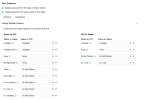
The application has the rights on the 3CX application in entra to read the teams status:
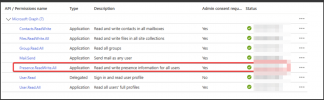
This are the rights for the app:
Do I miss something in the configuration to make it work ?
Thanks!
We have configured the M365 integration with the sync from 3CX app to teams client and to update presence from teams clients to 3CX.
For the moment we have only seen the sync work from 3CX App (PWA/desktop/web) to Teams client and not the other way around.
Is there anything else that need to be configured for it to work ?
The application has the rights on the 3CX application in entra to read the teams status:
This are the rights for the app:
Do I miss something in the configuration to make it work ?
Thanks!


