Solved Teams Status Update only one way

Status
Not open for further replies.

Danny_Ghe

Customer
Joined
Aug 20, 2019
Messages
13
Reaction score
2
Running 3CX Version 20.0 Update 5 (Build 506 Beta) I have this strange behaviour :

3CX status only updates in one way : from 3CX to TEAMS ( the other way doesn't work anymore )

I have checked , and both ways are correclty configured and authorized on M365 Tab,
Config looks also correct on Entra AD.

Any idea how to sort this out ?
 
Hi @Danny_Ghe could you please open a support ticket with us to check further the logs in this system.

Thanks!
 
  • Like
Reactions: N_G
Hi Alejandro,

Unfortunately, I didn't purchase the paid Support option with my 3CX Professional license.
Therefore, I cannot open a support ticket without having to pay for it.

This is why I'm going through this community to try to understand the source of this problem/bug.
 
You can ask your partner to open a ticket. Anyway, you can also try to configure the m365 integration again, not only authorize again.
 
  • Like
Reactions: Evolute IT
You can ask your partner to open a ticket. Anyway, you can also try to configure the m365 integration again, not only authorize again.
Thanks for the advice .

I have already :

  • Reconfigure the Integration.
  • Delete the App on Entra AD and recreate it from 3cx
  • Check Microsoft Graph API Permissions
  • Check redirect URI's
  • Check connectivity of 3CX
  • Check on Firewal for something blocked by a rule
3CX --> Teams : works fine
Teams --> 3CX : not working at all

Nothing on 3CX logs ( even in verbose mode ) except : TEAMS integration disabled.
But I guess it's more related to Teams Direct Routing ( not used in our case )
 
Thanks for the advice .

I have already :

  • Reconfigure the Integration.
  • Delete the App on Entra AD and recreate it from 3cx
  • Check Microsoft Graph API Permissions
  • Check redirect URI's
  • Check connectivity of 3CX
  • Check on Firewal for something blocked by a rule
3CX --> Teams : works fine
Teams --> 3CX : not working at all

Nothing on 3CX logs ( even in verbose mode ) except : TEAMS integration disabled.
But I guess it's more related to Teams Direct Routing ( not used in our case )
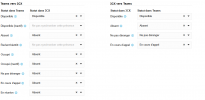
Have you set the statuses map? Right under the checkboxes. It's marked as beta.
 
You also need to activate the sync under the user options.
 
  • Like
Reactions: Evolute IT
Have you set the statuses map? Right under the checkboxes. It's marked as beta.
The status mapping is configured in both applications.

1737725286014.png
 
I resolved my issue.

Here are the two problems that were causing my deadlock:

- The 3 Azure P1 license options were not activated for all users
- Some users had Microsoft Graph application assigned to their account in Entra ID (you need to remove it for sync from Teams to 3CX)
 
Status
Not open for further replies.