The brand new app for Windows is a step downhill

Status
Not open for further replies.

jix

Customer
Advanced Certified
Joined
Aug 27, 2021
Messages
2
Reaction score
0
The brand new app for Windows is a step downhill, and I do not understand that it can end up in the Top 5 (YouTube review).

Windows can not recognize it as a phone device, and click to dial therefore does not work as well as in the old Chrome Browser extension.

Which by the way works fine up against v18, if only this one had been config before v18 rc2. then it also works on latest version of v18.
 
Windows can not recognize it as a phone device, and click to dial therefore does not work as well as in the old Chrome Browser extension.
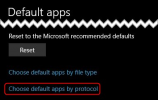
The new 3CX Desktop App actually works differently than the old Browser Extension when it comes to click2call as it does not convert every number to a clickable link, rather, it detects numbers that are actually defined as tel or callto links and converts those. If this does not work for you, you might want to check if the 3CX Desktop App is set as the default app for the callto and tel protocols under Windows Default Apps settings:
1630074632351.png

1630074936694.png

Also, do note that a new browser extension is planned: https://www.3cx.com/community/threads/v18-alpha-5-new-native-desktop-app.82175/post-387445
 
  • Like
Reactions: Evolute IT
number is not thrown into the 3CX Windows Desktop App on Click
Browser extensions aside, if I click on a tel:##### link on our web site (<a href="tel:630#######">(630) #######</a>), Firefox prompts for which application to open tel: links, and if I pick 3CX Desktop App the number appears in the dialer so I can click the green button to dial. If the tel: protocol is set in Windows for you, check to see your browser isn't set to something different?
 
  • Like
Reactions: Evolute IT
Status
Not open for further replies.

Forum statistics

Threads
112,349
Messages
592,027
Members
165,513
Latest member
megalmazan