The phone number you are trying to reach is currently experiencing temporary technical issues

Status
Not open for further replies.

IECSS

Customer
Joined
Nov 20, 2023
Messages
7
Reaction score
0
Can anyone give me a hint on where to start here? We aren't receiving any calls and we have paid for the service. Any assistance would be really appreciated! EO
 
Have you tried contacting your voip provider to check their side?
 
This is not a 3CX error message.
 
I did check our voip provider (Skytel) and they are stating that there are no outage issues. Sounds like I need to contact them anyway since this is not a 3CX error message.
 
I missed whether this was working previously and stopped, or if it has never worked. Can you provide more information?
 
Yes. It previously worked and now hasn't worked for months. Continues to say to call back later that the system is temporarily down. I submitted a ticket to Skytel. No representatives available to answer call.
 
Yes. It previously worked and now hasn't worked for months. Continues to say to call back later that the system is temporarily down. I submitted a ticket to Skytel. No representatives available to answer call.
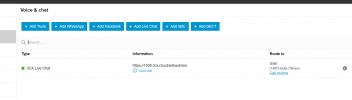
Have you also checked that your instance that the trunk is added and is registered under the Voice & Chat section of your admin console?
 
Have you also checked that your instance that the trunk is added and is registered under the Voice & Chat section of your admin console?
I have not. Let me see if I can sort that. Thank you.
 
I believe you are talking about the 3cx platform not Skyetel. I am logged into 3CX but very limited ability to change anything here. No real menu options that allow me to make the change you have depicted above.
1710432585182.png
 
Yes, logging in to your 3cx webclient, not the 3cx website.
 
I am getting the impression that everything we had set up some how got completely wiped out. Do we have to reset everything back up again?
 
It seems that way, but I can't know for sure as I will need to check the license key and the specific instance, which would require you to open a support ticket via your 3cx customer portal (portal.3cx.com) support section.

I would suggest re-setting this all up again and keeping an eye on it if anything changes.
 
First of all yes, this error message is specific to Skyetel. Secondly, this typically happens because your outbound caller ID is misconfigured or because of your spam filtration settings inside your Skyetel portal. The outbound caller ID settings can be configured inside 3CX either at an extension level or in the Outbound rules. By default Skyetel will block calls with a null or misconfigured caller ID. Also you may want to back off the spam filtration settings inside Skyetel to label a call as spam instead of silently blocking it.
 
Status
Not open for further replies.

Members Online Now

Forum statistics

Threads
111,832
Messages
589,278
Members
164,662
Latest member
DejanMDS