Tracing down why an extension rings for 1/2 a second and goes to VM

Status
Not open for further replies.

Kortek

Bronze Partner
Basic Certified
Joined
Mar 3, 2019
Messages
20
Reaction score
3
Since we upgraded from version 18 to version 20 on prem version, i notice that what a call comes in and an extension is entered, it will ring the phone for half a second and then dump the caller into voice mail. I notice thought that it only does it on certain extensions. I checked the status and it is set to available., This is how it is currently set:1724190200208.png which matches other users which do work, so I am a bit stumped by this. The schedule also shows 1724190367028.png which means call can come in at any time.
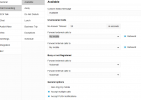
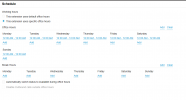
I tested changing the Busy or not Registered to forward calls to another extension and that did do that, so I am thinking the system thinks the user is either busy or unregistered, however they are not in this case. I also had a user from one extension call this perticular extension and it rings and works fine in that case, just external calls. I also went into Voice & Chat and selected the three little dots on the SIP trunk provider, selected edit, and it dumps me to the /#?people page which I know is not correct!

This all worked before upgrading to 20 so I can't understand why it is doing this.
 
Last edited:
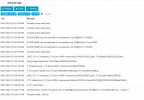
Was does the log tells you about such a call?
 
I see this in the log: 1724257317486.pngThen if I look at editing a trunk I get: 1724257636720.png
and then this page 1724257753944.png which I do not think is normal, is it? Shouldn't I be able to edit the trunk and see the data?
 
Last edited:
selected the three little dots on the SIP trunk provider, selected edit, and it dumps me to the /#?people page
There were earlier posts about accessing the Users tab that were related to missing/removed templates: https://www.3cx.com/community/threa...b-on-some-v20-systems-all-of-a-sudden.125276/. Is this a Generic trunk or supported SIP provider?

I don't know that my next idea is relevant, based on your log snippet, but we had a client whose SIP provider was configured to send the call twice...by name and IP I think it was. It did, and while the first one was ringing phones, the call would cancel and restart, 3CX would see all phones in use, and treat the "second" call as "no one available to answer." (no I didn't set it up, we took them over)
 
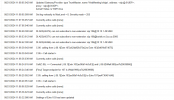
Hi. So we are using Cox Communications, however I just did a call from 1 extension to another and it did the same thing, rang for 1/2 a second and then went to voicemail. I checked with the destination user and he was not on the extention as both users were green and not on hook. I didn't have verbose logging enabled so I enabled it and then did the test call again and it worked this time. Very odd. I tried it two more times and it worked fine. So now that we have seen it happening station to station, I would rule out the SIP provider. Something though that caught my eye was the webmeeting bridge. We didn't have web meeting setup or configured in 18 and this was something I setup on 20. Also, in this log, you see 103 call 107, which rang 1/2 second and then VM, and the 107 called back 103 and that rang as normal. 1724264550766.png any ideas? Maybe something to do with web meetings? I will follow that article on the trunk editing to see if I get different results when trying to edit the SIP Trunk.
 
Here is an update. First off that link you sent to me about the editing of the SIP trunk doesn't address my issue unfortunatly,

I did a test call with CALLER-ID blocked (*67) and dialed ext. 103 and it did the half ring and then VM. I did the same with the external number calling the ext 103 and it doing the same thing, and that number is also listed in the user setting as the mobile phone #. I had another user from another ext. call 103 and it worked as normal. I then had that user call from their mobile phone on the mobile phone carrier and call in and dial ext 103. It worked normally and did not divert to VM. So this leads me to believe it is a rule that causes the call to divert to VM however it doesn't make sense with the first station to station call from 103 to 107 doing the same thing.
 
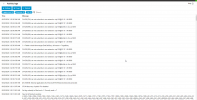
As this issue is driving me nuts and has me stumped, I decided to restore from backups to the first backup I have of 3CX v20 from 8/17 which I don't recall if the issue was there or not. ... I restored and it does the same thing. Here is the log:1724323157863.png
Plus the same weird thing when I try and edit my SIP Carrier's trunk and it dumps me to the /people webpage which is not where we configure trunks.... My only last idea is we do image backed VSS backups, I can restore it to the day after I upgraded it which from my recall it all worked ok after the 18 to 20 upgrade. Do you think I should do that or open a ticket with 3CX support?
 
So as a last attempt before giving up, I restored my system back to current. I went to try and edit the Cox SIP trunk and it dumped me to People which is wrong. I then exported the trunk and deleted it. I then made a new trunk with random data in it and saved it. I then tried to open it to edit, it worked correctly, so that would confirm that the SIP carrier trunk we had is messed up. I was planning on restoring the trunk I exported but I don't see that option, so I will restore one more time to put it back the way it is until someone can tell me what is the deal here.
 
SIP import is now Advanced > Templates > Provider Templates.
 
Steve, you are right. I did try that:
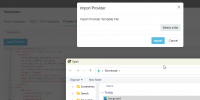
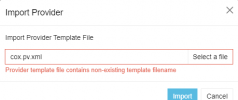
1724348964984.pngand then get an error 1724349014716.png but the file is not listed when I go through the list of templates to select from, so I am either not doing it correctly or something else is wrong? I looked under Generic and Preferred and both do not show it. I thought maybe I should rename the file but in the XML it states not to change it, so I suppose that is not correct?
 
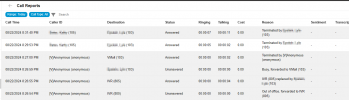
Maybe this will help. I see here that it says Busy, forward to VMail but the line is not busy and is set to available. This is when I called in from external line. When we make station to station it does not say busy and works fine. If I call other users externally it also works fine. Is there some place I can see why it thinks the line is busy? Really puzzled here.1724384220402.png
 
Status
Not open for further replies.

Latest Posts

Forum statistics

Threads
111,953
Messages
589,915
Members
164,850
Latest member
masvty