Transfer/intercom ringtone sound

Status
Not open for further replies.

allnatio

Free User
Intermediate Cert.
Joined
Apr 29, 2023
Messages
5
Reaction score
1
Hello everybody, I would like to know when I transfer a call to another user in my office, if i can change the tone/audio? For example , making the phone ring differently so I can distinguish it from a regular call. I have a Fanvil X7 V2 phones for my office.
 
Hi there, there is no distinctive ringtone for call transfers, although there is an option to ring using a different ringtone between internal and external calls if this helps.

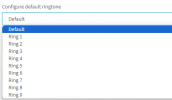
This option is found under the extension settings that the phones are provisioned to > Phone provisioning tab > Configure default ringtone.

Changing this option will ring with whichever ring tone is chosen for internal calls, so external calls will use the default ring tone set via the template.

1692983376469.png
 
Hi there, there is no distinctive ringtone for call transfers, although there is an option to ring using a different ringtone between internal and external calls if this helps.

This option is found under the extension settings that the phones are provisioned to > Phone provisioning tab > Configure default ringtone.

Changing this option will ring with whichever ring tone is chosen for internal calls, so external calls will use the default ring tone set via the template.

View attachment 36941
thank you very much for your help
 
  • Like
Reactions: Charles_3CX
You are very welcome. I am glad to help.
 
It seems that this has changed since version 20. I can no longer see provisioned to > Phone provisioning tab > Configure default ringtone. I only see option and just a couple of options that has nothing to do with it there... Can anyone help?
 
It's possible to use different ringtone from external/internal call in v20 with Microsoft Store Softphone?
 
Status
Not open for further replies.

Members Online Now

Forum statistics

Threads
111,835
Messages
589,289
Members
164,665
Latest member
dominik.pepel