Solved Triggering "Send email notification on missed call" for IVR

Status
Not open for further replies.

Sunny_99

Free User
Joined
Jun 4, 2020
Messages
27
Reaction score
3
Hi All,

i have my incoming calls going to a RingGroup with 3 members and a strategy "Ring All". After ring time, the "Destination if no answer" is set to "Connect to Digital Receptionist" and here an extension (97) kicks in with a prompt "The office is closed, please try again later".

I would like to receive an email every time a call reached this end of the line, but there is no option for extension 97.

The only way i see is to create a dummy extension (96) with a forwarding to (97) and the email option switched on.

1) Will this setup wotk as expected?
2) Is there a better solution (maybe voicemail with a prompt and email, but no recording)?
3) More general: under which circumstances the email notification is triggered?

All the best

Jens
 
Hi Jens,

Technically when the call goes to a Digital Receptionist and plays your prompt, then hangs up, the call is not "missed" because it was answered by the Digital Receptionist.
The idea you had forwarding to a "dummy" extension first, then to the DR again, the call would be answered so that shouldn't work.

I can think of 2 possible ways you could get something like this:
  • Swap the Ring Group for a Queue, and in the Queue enable the "Notify Queue Manager when a Queue call is lost" option in the "Notifications" tab. Don't forget to add a Queue Manager extension which should have the email you want to receive these emails.
    So, each time a call leaves the Queue and goes to the DR, you will get an email
OR
  • Create a Call Flow App and use 2 simple components to replace your current DR:
    - Prompt Playback: here you would put the .wav file you would want to be played
    - E-mail Sender: that would contain the target email address and the text you want to be sent.
The 2nd solution is a bit more flexible and "cleaner", but requires a bit of practice with the Call Flow Designer.
The 1st option though should work as well.
 
Hello Nick,

i am not familiar with the concept of the queues and the agents logon/logoff and stuff, so if possible i would like to go with the Call Flow Designer. I will check that.

What about the voicemail with email but no recording?

Imaging to setup ext. 97 so that every call will be forwarded to voicemail as quick as possible. It gives you the prompt "Office closed..." and send an email, but there is no recording available, and the call will end. Is that possible?

And another question: Is there a scenario where the email notification on a normal extension is fired? If every kind of forwarding do not counts as a missed call, what does?


All the best

Jens
 
Imaging to setup ext. 97 so that every call will be forwarded to voicemail as quick as possible. It gives you the prompt "Office closed..." and send an email, but there is no recording available, and the call will end. Is that possible?
This is a good thought, using the VMail prompt to play the message "Out office is closed....", but VMails will give a 'beep' and then start recording whatever the caller says. IF you don't mind that though, it could work.


And another question: Is there a scenario where the email notification on a normal extension is fired? If every kind of forwarding do not counts as a missed call, what does?
To get this to work, on the "dummy" extension, you would have to set the ring timeout to something short, like 1 second, then forward to the DR. Also you would have to have a device of softclient registered to this extension, so it actually rings for 1 second.
In this setup, you would get an email of a "missed call" from the "dummy" extension, but I find this setup prone to error plus you would have to actually have something registered.


Maybe there are other ways that I can have not thought of, so some other user may pitch in?
 
Hello Nick,

the beep is no problem, because this is not a "normal" situation. If a caller gets confused, i will add a "..the call ends after the beep." to the prompt. ;-)

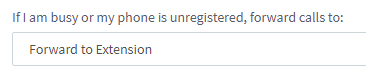
But i am confused about a device has to be registered to an extension to have the state "Call missed" fired. The extension setup shows:
1612369089203.png
So if i am busy and a second call comes in, it will be forwarded, but do NOT count as "Call missed"? Same thing if my extension device is unregistered? I think this is the most standard situation where i want to be notified.

What about setting the dummy extension to "Away" or "DND"? Would this do any difference?


All the best

Jens
 
So if i am busy and a second call comes in, it will be forwarded, but do NOT count as "Call missed"? Same thing if my extension device is unregistered? I think this is the most standard situation where i want to be notified.
I suppose you could do that yes, you should receive an email in either situation. :)
 
Hello Nick,

i tried the following setup:

- I created an intermediate extension (96) and set all forward conditions to ext. 97 (the IVR with the "Office is closed..." prompt). For state "Available after 1 second and for state "Away".
- I switched on the "Send email notification..." in Options.
- The RingGroup for incoming calls was set to transfer to ext. 96 after 55 seconds
- I logged in ext. 96 and set the state to "Away" (*)

A quick test showed that this is working. I got an email for each missing call, either for an external and for an internal call. But even better, the original caller ID is forwarded from the RingGroup to ext. 96, so the email shows that ID also. That's exactly what i wished for.

(*) "Away" should forward a call without any delay, but "Available" and "Away" seems to work the same way here. But i have the impression that i could hear a ring tone or MOH for a fraction of a second in the moment the call is transfered from 96 to 97. Not sure about this...

And to go back to question (1): Yes, (2): I don't know ;-) and (3): It seems like the email notification is triggered every time you do not pick-up a call.


So, as always, thank you very much.


All the best

Jens
 
  • Like
Reactions: NickD_3CX
I'm glad you got the behavior you wanted!

But i have the impression that i could hear a ring tone or MOH for a fraction of a second in the moment the call is transfered from 96 to 97. Not sure about this...
This is probably true, when transferring, during the small gap as the process takes places, MoH is heard.

Settings as "Solved".
 
Status
Not open for further replies.

Forum statistics

Threads
111,974
Messages
590,081
Members
164,899
Latest member
mazet