Two issues - missing user and editing a trunk

Status
Not open for further replies.

Shane Farmer

Premier Customer
Joined
May 15, 2017
Messages
59
Reaction score
6
I can find his phone extension, and it shows his user, but when I got to users and search, it can't find extension or search using the name. I get no results.

I wanted to see what DIDs were available on a trunk, but I get a red symbol indicating no access. I also can't click the 3 dots on the right. I can edit any trunks below that. I can go to a user and see the DIDs there if I act like I'm going to add on, but what if I need to edit or delete the trunk?
 
I can find his phone extension, and it shows his user, but when I got to users and search, it can't find extension or search using the name. I get no results.
What version is your PBX?
Where are you looking for the user?
Please share screenshots (hide the number).
 
v20 Update 2
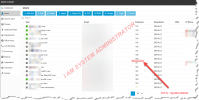
Looking for User in Users
https://i.imgur.com/0GR6Qtb.png https://i.imgur.com/aERV7zt.png
 
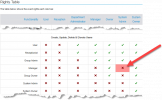
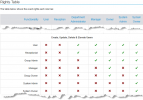
https://www.3cx.com/docs/manual/access-roles/

It seems that your role does not allow you to see all users. You can only see those who are part of your department.
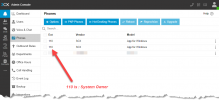
Regarding the reason you see "phone" displayed, unless I'm mistaken, this appears to be a leak; you shouldn't be able to see it. Alternatively, 3CX may have intentionally set phones to "read-only" to indicate that the extension exists (hence, it cannot be reassigned) but is not editable by you. Both reasons are possible.


EDIT

After conducting some tests, I found an example of how to reproduce the behavior.

You occupy a role "below" that of the user in question. For instance, you are a system administrator and the user is an owner, which restricts your permission to make changes.

The reason you can see their phone is likely because, as a system administrator, it might be relevant to see the devices connected to the system, logically.

@MichaelB_3CX @N_G
Is it normal for a system administrator to see the owner's phone in the phone tab, but for 3CX to hide the owner from the user list?
Small leak ? :) Or is it designed this way intentionally? :p
 
Last edited:
1726253087682.png

It is normal not to be able to see a user with a higher-level role.
This is the correct behavior.


1726253096103.png


We can see it in the phone list.
Is this the intended behavior ?

Just to get an "official response" , Hiding it is good behavior based on role level logic.
However, displaying it is also appropriate, considering the logic behind the "System Administrator" role.

However, the two pages respond to contradictory controls.

:p
 
That all makes sense, but he's a Manager, and I am System Administrator. I logged in as System Owner, though, and I could see that user.

I would assume system-wide roles would trump the others including Manager? Or do I need to be Owner? But then I can't manage phones according to that chart, either if Owner, unless I'm reading that incorrectly. I can even make myself System Owner? We're a relatively small environment so it's not a huge deal. They could honestly be fine with Receptionist, as well, but technically, they would be Department Administrators, but they need intercom, so that's how I settled on Manager.
 
Last edited:
I can even make myself System Owner?
With a user role such as Department Administrator, Manager, Owner, or System Admin, you cannot elevate yourself or someone else to a higher level than your own. The system will not allow it.

The role of System Owner takes precedence over all others. The only limitation of the System Owner is that it does not allow other members to see the identity of the caller or callee with whom the owner is communicating (confidentiality).

but he's a Manager, and I am System Administrator.

Ah, that explains everything.
A system administrator is typically a partner managing the system or an IT administrator.
The role is designed to prevent a system admin from accessing information they should not see.
If your goal is to have access to everything, you need the Owner role. Don’t dwell on the name; it’s just a title, so don’t try to infer any hierarchy from it. In Windows, there’s an option for “God Mode,” but even though I become a god, my wife still decides my curfew time if I want to sleep in our bed. Haha! xD


1726257115378.png


Have nice day
 

Attachments

  • 1726257007538.png
    1726257007538.png
    55.4 KB · Views: 0
Thanks for taking the time to explain it to me. I really appreciate it. That all makes sense now.
 
  • Like
Reactions: Guillaume Bourgeois
Status
Not open for further replies.

Forum statistics

Threads
111,954
Messages
589,921
Members
164,851
Latest member
DrunkeMeister