Two numbers on one sip trunk outgoing rules

Status
Not open for further replies.

Pawci__o

New User
Joined
Nov 29, 2021
Messages
3
Reaction score
1
Hello dear users, please help me to solve my problem.
i have 3cx on my linux server - verjsa 18.0.0
i have 1cx on which i have two phone numbers:
xxx01
xxx00
number xxx01 is the main trunk number,
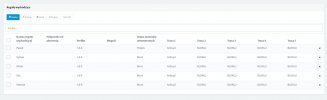
my problem is with outgoing rules - i would like outgoing calls for one group of users to be made from number xxx00 - currently outgoing calls are made from number xxx01.
in sipTrunk I entered both DID/DDI numbers
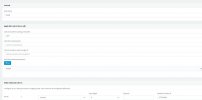
in outgoing rules for user in Outbound Caller ID field I entered xxx00 number but unfortunately still calls are going out from xxx01 number
please help me to solve my problem.
 

Attachments

  • pawel_outbound.jpg
    pawel_outbound.jpg
    96.8 KB · Views: 11
Hello @Pawci__o

To achieve what you need you will need 2 outbound rules. One for each group of extensions which will have its own caller ID.

From your screenshot I see that you are using actio.pl as your provider but your caller ID looks like a US free number like the ones Callcentric is providing. If that is the case then this will not work as Actio.pl does not support Clip no Screening which means you can only use their numbers as caller IDs.
 
Thanks, I don't fully understand what you wrote - I have a separate outgoing rule for each user (attachment), how do I add an outgoing rule for a group? I mean I have two numbers in Actio.pl and I want only calls from one user (group) to go out from the main number and all the other calls to go out from the second number. Currently all calls go out from the first number.
 

Attachments

  • Screenshot_2.jpg
    Screenshot_2.jpg
    78.6 KB · Views: 8
So you need to divide your users into 2 groups, Group A and Group B.
You need one outbound rule for Group A where the outbound caller should be set as Number 1 and one outbound rule for Group B where the outbound caller ID is Number 2.

You can divide your users into groups either by creating 2 separate user groups from Users / Groups or by specifying the extensions for each group in your outbound rule.

If you have everything set up correctly check the activity log of the PBX for the Invite towards the provider and check if the correct caller ID is sent. If it does then contact Actio.pl and ask them why you are seeing the wrong caller ID. You will need to set the logging level of the activity log to verbose. You can do so by navigating to Dashboard / Activity Log / Settings and set the logging level to Verbose.
 
Hello, thank you for your answer, I made the changes you wrote about and verified in the logs and it turns out that the caller ID is sent correctly (you can see it in the logs) I reported the problem to Actio.pl - I will let you know when I get an answer from them.
 
  • Like
Reactions: YiannisH_3CX
Status
Not open for further replies.

Forum statistics

Threads
112,326
Messages
591,901
Members
165,479
Latest member
Senergia