Unable to Access 3CX Management Console

Status
Not open for further replies.

arnie.cuenta

Customer
Joined
Aug 17, 2019
Messages
43
Reaction score
3
Good Morning,

I tried to download the latest update of the 3CX regarding the Hotfix for Memory Issue. After I download the latest update and tried to access the management console, it says 403 Forbidden nginx. I also check my services, but all of them are running.
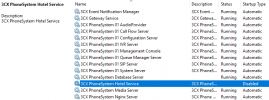
1648004280461.png

Thank you.
 
Have you tried restarting?

You could also try re-running the installer again making sure to run as admin.

Make sure you disable any antivirus beforehand.
 
  • Like
Reactions: NickD_3CX
If you're trying to access the Management Console from a remote location, make sure you're using https with your https port (443 or 5001) such as:
HTTPS://<FQDN>:<HTTPS_PORT>

If you still get the same and the PBX is on premise please try it locally as well and let me know if you get the same thing. From the local network try:

HTTPS://<PBX_LOCAL_IP>:<HTTPS_PORT>
 
i just want to say that I would not recommend modifying any file permission as everything should be in order if the 3CX Instance at hand was deployed as per our guides. Do bear in mind that making such modifications will very likely also render the 3CX instance in question an unsupported deployment.

@arnie.cuenta

Have you tested what I mentioned in my previous reply? If yes what happened?
 
Status
Not open for further replies.

Forum statistics

Threads
111,974
Messages
590,083
Members
164,900
Latest member
Silent_Guru