Solved Unable to add Twilio Trunk

Status
Not open for further replies.

Hitman1979

Silver Partner
Basic Certified
Joined
Nov 13, 2024
Messages
4
Reaction score
0
Hi members,

I have enrolled for free edition of hosted 3cx but I am unable to create any trunk.

Version 20.0 Update 5 (Build 510)

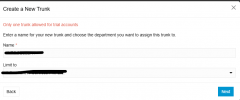
I get error "Only one trunk allowed for trial accounts". I dont have any trunks apart from 3cx live chat default one.

Any pointers are appreciated.

Regards
HitScreenshot 2025-01-23 194250.png
 
Hello @Hitman1979

I will send you a pm to ask for some specifics.
 
Hey did you resolve your issue? I am having the same issue.
 
Nope.. it didn't work for me. Thinking of upgrading the account with Twilio.
 
In your Twilio account the trunk has been registered. You will need to delete this from your Twilio account. This is not a 3CX error.

Twilio sees that you tried to connect a trunk. Even if you delete it from 3CX, it will still see it as a trunk in the providers portal.
 
  • Like
Reactions: GregG_3CX
I am not sure how my twilio trunk could have been registered as I just created the Twilio account to be used with 3cx.
 
You can see the configured sip trunks in your twilio account. Just click on the assigned number and you should see a drop down with assigned SIP Trunks.
 
I was able to resolve the issue, it was not because the trunk was assigned it was because my account was still in the trial stage. Once I've upgraded I was able to add the Twilio trunk.
 
  • Like
Reactions: NicholasP_3CX
Status
Not open for further replies.

Members Online Now

No members online now.

Forum statistics

Threads
111,832
Messages
589,286
Members
164,662
Latest member
DejanMDS