Solved Unable to connect with 3CX License server. Check your network and try again.

Status
Not open for further replies.

iramireze

Free User
Joined
Mar 5, 2021
Messages
6
Reaction score
1
Hi -

We are doing a manually installation under Debian 9, but we are stocked with the activation process.

We changed DNS to Google's (8.8.8.8 8.8.4.4) without success. It is a fresh installation, no firewall or any other software, under Contabo's VPS plataform.

Does anyone know how to solve this issue?

We'll really appreciate your help.

Regards,
 
The most usual reason is that something is 'inspecting' the connection, like DPI on Firewalls, etc.

Maybe you should try one of our tested Hosting Platforms or contact a Hosting Partner of ours if all else fails:
https://www.3cx.com/partners/hosted-pbx-providers/

To troubleshoot though, you may have to run a packet capture to see if the requests are reaching activation.3cx.com, and if yes, what is happening to the to the TLS connection and who is terminating it.

One last thought although I doubt it, as you are doing it manually, I don't know what version you are trying to install, make sure you are trying to install something newer than 16.0.5.xxx, because older versions can't activate.
 
Hello,

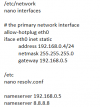
If it isn't the DNS then it's the gateway. And make sure you added the /24 to the address. Here are my notes:

1615042326537.png


The Debian install is a bit different than Raspberry Pi
 
Hi -

Contabo has a "direct" connection to any server.

It looks like it is resolving correctly to activation.3cx.com.

Doing a tcpdump (tcpdump -i eth0 dst activation.3cx.com -r log.log -vv) we got the following log after trying to activate:

reading from file log.log, link-type EN10MB (Ethernet)
19:25:04.884490 IP (tos 0x0, ttl 64, id 21574, offset 0, flags [DF], proto TCP (6), length 60) vmi533962.contaboserver.net.39232 > 151.80.125.88.https: Flags , cksum 0xecd8 (incorrect -> 0xf346), seq 2164415511, win 29200, options [mss 1460,sackOK,TS val 163303 ecr 0,nop,wscale 7], length 0

19:25:04.899324 IP (tos 0x0, ttl 64, id 21575, offset 0, flags [DF], proto TCP (6), length 52)
vmi533962.contaboserver.net.39232 > 151.80.125.88.https: Flags [.], cksum 0xecd0 (incorrect -> 0x1e3e), seq 2164415512, ack 1912819869, win 229, options [nop,nop,TS val 163307 ecr 210019783], length 0

19:25:04.900218 IP (tos 0x0, ttl 64, id 21576, offset 0, flags [DF], proto TCP (6), length 255)
vmi533962.contaboserver.net.39232 > 151.80.125.88.https: Flags [P.], cksum 0xed9b (incorrect -> 0x9018), seq 0:203, ack 1, win 229, options [nop,nop,TS val 163307 ecr 210019783], length 203

19:25:04.915845 IP (tos 0x0, ttl 64, id 21577, offset 0, flags [DF], proto TCP (6), length 64)
vmi533962.contaboserver.net.39232 > 151.80.125.88.https: Flags [.], cksum 0xecdc (incorrect -> 0x4f41), seq 203, ack 1, win 258, options [nop,nop,TS val 163311 ecr 210019783,nop,nop,sack 1 {1449:3345}], length 0

19:25:04.915886 IP (tos 0x0, ttl 64, id 21578, offset 0, flags [DF], proto TCP (6), length 52)
vmi533962.contaboserver.net.39232 > 151.80.125.88.https: Flags [.], cksum 0xecd0 (incorrect -> 0x102a), seq 203, ack 3345, win 281, options [nop,nop,TS val 163311 ecr 210019784], length 0

19:25:04.917597 IP (tos 0x0, ttl 64, id 21579, offset 0, flags [DF], proto TCP (6), length 302)
vmi533962.contaboserver.net.39232 > 151.80.125.88.https: Flags [P.], cksum 0xedca (incorrect -> 0xb1ba), seq 203:453, ack 3345, win 281, options [nop,nop,TS val 163311 ecr 210019784], length 250

19:25:04.939257 IP (tos 0x0, ttl 64, id 21580, offset 0, flags [DF], proto TCP (6), length 52)
vmi533962.contaboserver.net.39232 > 151.80.125.88.https: Flags [F.], cksum 0xecd0 (incorrect -> 0x0ebc), seq 453, ack 3452, win 281, options [nop,nop,TS val 163317 ecr 210019786], length 0

We have highlighted in red the incorrect response.

We don't understand what the error is about.

Does anyone know how to solve this issue?

Regadrs,
 
Are you not able to use an ISO on your VPS and install 3CX the supported way?

also, a google search would have given you this:

You see the "incorrect" checksums due to a feature called TCP checksum offloading. The checksum fields for outgoing TCP packets are not pre-calculated by the operating system but instead set to 0 and left for calculation by the NIC processor. The Wireshark FAQ has a more detailed explanation.

use tcpdump --dont-verify-checksums

You should only see incorrect checksums on packets sent by your machine. This is not specific to Wireshark, any packet capture software working at this level will produce similar results. If you see checksum fails on received packets, there might be a problem indeed - these packets are discarded by the TCP stack and trigger retransmission as well as congestion control algorithms - which will have a direct impact on data throughput
 
Are you not able to use an ISO on your VPS and install 3CX the supported way?

also, a google search would have given you this:

You see the "incorrect" checksums due to a feature called TCP checksum offloading. The checksum fields for outgoing TCP packets are not pre-calculated by the operating system but instead set to 0 and left for calculation by the NIC processor. The Wireshark FAQ has a more detailed explanation.

use tcpdump --dont-verify-checksums

You should only see incorrect checksums on packets sent by your machine. This is not specific to Wireshark, any packet capture software working at this level will produce similar results. If you see checksum fails on received packets, there might be a problem indeed - these packets are discarded by the TCP stack and trigger retransmission as well as congestion control algorithms - which will have a direct impact on data throughput
Hi -

Thanks for your help and quick response on this.

We ran tcpdump as you recommended while trying to register (tcpdump -i eth0 dst activation.3cx.com -r log.log -vv --dont-verify-checksums), and this is the result:

reading from file log.log, link-type EN10MB (Ethernet)

14:54:11.008809 IP (tos 0x0, ttl 64, id 6470, offset 0, flags [DF], proto TCP (6), length 60)
vmi533962.contaboserver.net.49232 > 151.80.125.88.https: Flags , seq 532939222, win 29200, options [mss 1460,sackOK,TS val 2591543 ecr 0,nop,wscale 7], length 0

14:54:11.022758 IP (tos 0x0, ttl 64, id 6471, offset 0, flags [DF], proto TCP (6), length 52)
vmi533962.contaboserver.net.49232 > 151.80.125.88.https: Flags [.], seq 532939223, ack 838356618, win 229, options [nop,nop,TS val 2591547 ecr 217034293], length 0

14:54:11.023936 IP (tos 0x0, ttl 64, id 6472, offset 0, flags [DF], proto TCP (6), length 255)
vmi533962.contaboserver.net.49232 > 151.80.125.88.https: Flags [P.], seq 0:203, ack 1, win 229, options [nop,nop,TS val 2591547 ecr 217034293], length 203

14:54:11.035055 IP (tos 0x0, ttl 64, id 32546, offset 0, flags [DF], proto TCP (6), length 60)
vmi533962.contaboserver.net.49234 > 151.80.125.88.https: Flags , seq 1437426508, win 29200, options [mss 1460,sackOK,TS val 2591550 ecr 0,nop,wscale 7], length 0

14:54:11.039507 IP (tos 0x0, ttl 64, id 6473, offset 0, flags [DF], proto TCP (6), length 52)
vmi533962.contaboserver.net.49232 > 151.80.125.88.https: Flags [.], seq 203, ack 3345, win 281, options [nop,nop,TS val 2591551 ecr 217034295], length 0

14:54:11.041812 IP (tos 0x0, ttl 64, id 6474, offset 0, flags [DF], proto TCP (6), length 302)
vmi533962.contaboserver.net.49232 > 151.80.125.88.https: Flags [P.], seq 203:453, ack 3345, win 281, options [nop,nop,TS val 2591551 ecr 217034295], length 250

14:54:11.046920 IP (tos 0x0, ttl 64, id 32547, offset 0, flags [DF], proto TCP (6), length 52)
vmi533962.contaboserver.net.49234 > 151.80.125.88.https: Flags [.], seq 1437426509, ack 1576737014, win 229, options [nop,nop,TS val 2591553 ecr 217034296], length 0

14:54:11.047789 IP (tos 0x0, ttl 64, id 32548, offset 0, flags [DF], proto TCP (6), length 255)
vmi533962.contaboserver.net.49234 > 151.80.125.88.https: Flags [P.], seq 0:203, ack 1, win 229, options [nop,nop,TS val 2591553 ecr 217034296], length 203

14:54:11.060902 IP (tos 0x0, ttl 64, id 32549, offset 0, flags [DF], proto TCP (6), length 52)
vmi533962.contaboserver.net.49234 > 151.80.125.88.https: Flags [.], seq 203, ack 1449, win 251, options [nop,nop,TS val 2591556 ecr 217034297], length 0

14:54:11.060934 IP (tos 0x0, ttl 64, id 32550, offset 0, flags [DF], proto TCP (6), length 52)
vmi533962.contaboserver.net.49234 > 151.80.125.88.https: Flags [.], seq 203, ack 3345, win 281, options [nop,nop,TS val 2591556 ecr 217034297], length 0

14:54:11.062504 IP (tos 0x0, ttl 64, id 32551, offset 0, flags [DF], proto TCP (6), length 302)
vmi533962.contaboserver.net.49234 > 151.80.125.88.https: Flags [P.], seq 203:453, ack 3345, win 281, options [nop,nop,TS val 2591557 ecr 217034297], length 250

14:54:11.074108 IP (tos 0x0, ttl 64, id 6475, offset 0, flags [DF], proto TCP (6), length 52)
vmi533962.contaboserver.net.49232 > 151.80.125.88.https: Flags [F.], seq 453, ack 3452, win 281, options [nop,nop,TS val 2591560 ecr 217034296], length 0

14:54:11.079888 IP (tos 0x0, ttl 64, id 32552, offset 0, flags [DF], proto TCP (6), length 52)
vmi533962.contaboserver.net.49234 > 151.80.125.88.https: Flags [F.], seq 453, ack 3452, win 281, options [nop,nop,TS val 2591561 ecr 217034298], length 0

14:54:28.915164 IP (tos 0x0, ttl 64, id 28347, offset 0, flags [DF], proto TCP (6), length 60)
vmi533962.contaboserver.net.49236 > 151.80.125.88.https: Flags , seq 108045648, win 29200, options [mss 1460,sackOK,TS val 2596020 ecr 0,nop,wscale 7], length 0

14:54:28.929423 IP (tos 0x0, ttl 64, id 28348, offset 0, flags [DF], proto TCP (6), length 52)
vmi533962.contaboserver.net.49236 > 151.80.125.88.https: Flags [.], seq 108045649, ack 918840311, win 229, options [nop,nop,TS val 2596023 ecr 217036084], length 0

14:54:28.930497 IP (tos 0x0, ttl 64, id 28349, offset 0, flags [DF], proto TCP (6), length 255)
vmi533962.contaboserver.net.49236 > 151.80.125.88.https: Flags [P.], seq 0:203, ack 1, win 229, options [nop,nop,TS val 2596024 ecr 217036084], length 203

14:54:28.947323 IP (tos 0x0, ttl 64, id 28350, offset 0, flags [DF], proto TCP (6), length 64)
vmi533962.contaboserver.net.49236 > 151.80.125.88.https: Flags [.], seq 203, ack 1, win 258, options [nop,nop,TS val 2596028 ecr 217036084,nop,nop,sack 1 {1449:3345}], length 0

14:54:28.947370 IP (tos 0x0, ttl 64, id 28351, offset 0, flags [DF], proto TCP (6), length 52)
vmi533962.contaboserver.net.49236 > 151.80.125.88.https: Flags [.], seq 203, ack 3345, win 281, options [nop,nop,TS val 2596028 ecr 217036085], length 0

14:54:28.948850 IP (tos 0x0, ttl 64, id 28352, offset 0, flags [DF], proto TCP (6), length 302)
vmi533962.contaboserver.net.49236 > 151.80.125.88.https: Flags [P.], seq 203:453, ack 3345, win 281, options [nop,nop,TS val 2596028 ecr 217036085], length 250

14:54:28.968404 IP (tos 0x0, ttl 64, id 28353, offset 0, flags [DF], proto TCP (6), length 52)
vmi533962.contaboserver.net.49236 > 151.80.125.88.https: Flags [F.], seq 453, ack 3452, win 281, options [nop,nop,TS val 2596033 ecr 217036087], length 0

We don't know if this checks the connection or finds out on which node the connection drops.

Can you please help us to understand the issue?

Regards,
 
Hi -

We've been working on this with Contabo's team. Great support and attitude to solve the issue. 100% recommended.

Here is their answer:

--->
We reinstalled the server as you requested.

Furthermore we been able to do a telnet connection to the server, so a connection from your server to the activation server. However the connection gets closed by the foreign host.

telnet activation.3cx.com 443
Trying 151.80.125.88...
Connected to activation.3cx.com.
Escape character is '^]'.
Connection closed by foreign host.

So we kindly suggest to contact 3cx again in this case.
Please ask them if the IP is on their blacklist by any chance.

<----

I found this in the forum:
https://www.3cx.com/community/threads/unable-to-activate-the-licence.59808/
and don't want to be in the same situation.

Does anyone knows how to solve this?

Thank you..

This is the second IP address we use to try to connect, How can we know if an IP address in blocked by 3CX servers?
 
Hi -

We continue working on this, and this is the Contabo's conclusion:

---->
It seems that either a bad routing between our network and 3cx or a simple block of them is causing these issues.
<----

Does any one know if 3CX makes any kind of blocks?

Regards,
 
Hi!

I will re-assign this to the Cloud Team section of the forum. Could you please send a PM to @nikosT_3CX with the Public IP of your installation that is not activating so that he can check?
 
Hi!

I will re-assign this to the Cloud Team section of the forum. Could you please send a PM to @nikosT_3CX with the Public IP of your installation that is not activating so that he can check?
Hi Nick -

Thanks for your kind and quick response. I just started a conversation with you with the same topic.

Regards,
 
  • Like
Reactions: NikosT_3CX
@iramireze as per private conversation issue has been identified on the machine and not in our activation infrastructure. After installing some packages at your machine all is sorted now so i will mark this thread as Resolved!!
 
  • Like
Reactions: NickD_3CX
Status
Not open for further replies.

Forum statistics

Threads
111,974
Messages
590,081
Members
164,899
Latest member
mazet