Unable to dail calls from Teams client

Lev Slyusarchuk

Bronze Partner
Joined
Feb 9, 2022
Messages
6
Reaction score
0
Hello! I am trying to integrate 3CX with Teams. User was synchronized with Office 365 and Teams, but trying to call from Teams app we got an error: "With your calling license, you can only call people within your organization. Talk to your IT admin". Can it be not Teams license problem? User has Office 365 Enterprise E5 (without Audio Conferencing)+Audio Conferencing Office 365.
3CX license - Enterprice 32 calls

 
Hello! I am trying to integrate 3CX with Teams. User was synchronized with Office 365 and Teams, but trying to call from Teams app we got an error: "With your calling license, you can only call people within your organization. Talk to your IT admin". Can it be not Teams license problem? User has Office 365 Enterprise E5 (without Audio Conferencing)+Audio Conferencing Office 365.
3CX license - Enterprice 32 calls

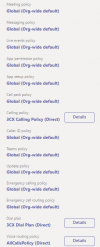
Sounds like a misconfigured policy. Have you run the two Powershell scripts for the integration?
 
  • Like
Reactions: NickD_3CX
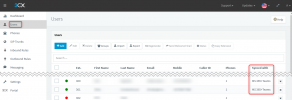
Also in Users, do you see "MS 365+Teams" next to the Extension?
1644399490461.png
 

Attachments

  • 1644402322854.png
    1644402322854.png
    38.6 KB · Views: 24
Excuse me if this may be a silly question, but, you are logging into Teams using the user/email that is synced in 3CX, correct?

Also in the Teams Admin portal under "Users", do you see the user with the email that synced?

If the answer is 'yes' to both of the above, I think you may in fact have to contact Microsoft to tell you why exactly you are getting this error, unless someone else has any idea.
 
  • Like
Reactions: Evolute IT
xcuse me if this may be a silly question, but, you are logging into Teams using the user/email that is synced in 3CX, correct?
User "Testman" - have no admin access into Teams Admin portal.
But Teams Admin portal admin user synced with 3CX yes.
Also in the Teams Admin portal under "Users", do you see the user with the email that synced?
User "testman" has same email for 3CX and Teams.
 
unless someone else has any idea
I think it's license problem. Maybe "Office 365 Enterprise E5 (without Audio Conferencing)" not enough for Direct Routing. Could it be?
Also noticed another problem in "Direct Routing". Warning says "The Session Border Controller exists in our database (your administrator created it using the command New-CSOnlinePSTNGateway). It's configured to send SIP options but we never saw SIP options coming back from this SBC."
 

Attachments

  • 1644413850106.png
    1644413850106.png
    6.6 KB · Views: 6
Did you up to 24h after setting it up?
 
I think it's license problem. Maybe "Office 365 Enterprise E5 (without Audio Conferencing)" not enough for Direct Routing. Could it be?
Microsoft licensing is so weird sometimes that I think the best would be to ask Microsoft directly about this.


Also noticed another problem in "Direct Routing". Warning says "The Session Border Controller exists in our database (your administrator created it using the command New-CSOnlinePSTNGateway). It's configured to send SIP options but we never saw SIP options coming back from this SBC."
For a newly created SBC/Integration, this is OK, this takes days of operation to start gathering statistics.
 
  • Like
Reactions: Evolute IT
Yes, it was set up 4 or 5 days ago

Ok, thaks

But it was set up 4 or 5 days ago...
Yes, but you haven't got it working yet due to this Licensing Issue, so the usage is not enough. Anyway, you can worry about that after the license error has gone away.
 

Members Online Now

Forum statistics

Threads
111,831
Messages
589,277
Members
164,660
Latest member
RJenkinsROCK