Solved Unable to provision T54W as Phone Router

Status
Not open for further replies.

egaulue

Free User
Joined
Feb 20, 2023
Messages
28
Reaction score
2
Dear Community,

We have a self hosted 3CX install and want to configure a Yealink T54W for one of our external worker (we know mobile device is another solution but we want him to share the same environnement as other workers). As far as I understand, as this guy won't be in the lan, we have to configure this IP phone as Phone Router.

We have followed the documentation:
  • upgrade the firmware to last version ending 76
  • configure the phone from the web client (and not the console)
  • then the documentation is not clear => plug it to the network within 14 days : which network? LAN I suppose, either the phone will never get any idea of where to download configuration. I imagine you plug it in the LAN, then it gets its configuration, then you can use it in the remote network.
  • when I plug it on the LAN: it says something like "update config" for a long time and then "skip config". At last nothing is configure.
Then I've got several question:
  • What do I'm doing bad?
  • Is this the right configuration way I should use for this remote phone? Trying to provision it directly through URL give 403 with HTTP 5000 and 404 with HTTPS 5001
  • Why any mobile phone can connect my 3CX through its public address and it works, but IP phone can't? Are they silently acting as router phone?
Thanks for your help and best regards,
 
Hi,

The deployment method is correct, but maybe the phone is trying to reach your PBX via the internet (to download config) and its failing.

Usually for on-premise installations this is because:

- Your HTTPS port is not open (try reaching webclient from a mobile 4G only connection)
- There is something wrong with your SSL certificate*
- The MAC of the phone was maybe entered wrong (it happens sometimes :) )


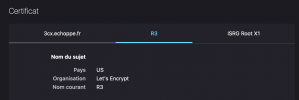
Pay attention to the certificate, especially if you have a custom FQDN. It could be missing the intermediate certs, or you could be using a CA that Yealink does not happen to include in the firmware.
 
Hi,

I've checked HTTPS 5001 is open and the MAC address.

For the certificate, I did implement letsencrypt 2 days ago. Could letsencrypt not be supported?

If ever, is there any configuration possible on the Yealink before it gets 3CX configuration?

Other idea: as 3CX advise it, the IP gets by DNS is not the same if you are on LAN and on WAN. In order to troubleshoot the problem what is the ip phone should do during the process in order for me to try to dump network packet and investigate. Hence, my firewall disallow undeclared traffic to the outside, what port should I open for it.

Regards,
 

Attachments

  • Capture d’écran 2023-08-30 à 14.14.12.png
    Capture d’écran 2023-08-30 à 14.14.12.png
    61.6 KB · Views: 9
So based on the FQDN I see in the screenshot, I think you are trying to run a custom FQDN on a Free 3CX license. This will not work. You need to have a Pro or Enterprise license:

- Then install 3CX from scratch using your key which has the 3CX-provided FQDN released
- Define the new FQDN during installation
- Provide correct certs for the correct FQDN (let's encrypt is good)

Right now your phone is probably receiving the wrong config, and it's not able to reach your machine due to FQDN mismatch. This also affects the contents of the config file (phonebook URL, provisioning URL, SIP server URL etc).

Also you seem to be missing your intermediate/chain certificates so the TLS chain is broken currently so the Yealink might not even be able to establish a connection at all.
 
Last edited:
Sorry, it's a PRO licence. When the pro licence has been installed, it has been created with another email address. I didn't find any tool to put the old licence and the new one on the same account.

I discovered that this morning. So I'm in the process to change the nickname of my previous account, in order to free this one (e-gaulue) and so connect it (in one month to the new account). This process is a pain, but it's my fault, I should have been more careful when we have register the PRO licence.

So I can tell we are on a PRO licence with a custom FQDN (I don't want to give it here) as we have observed we had quite less unattended traffic when we have moved to custom FQDN.
 
Last edited by a moderator:
When I trace what is doing this IP phone while rebooting and then getting it's configuration, it looks stuck to a communication to HTTPS 443 to rpscloud.yealink.com, it never manages.

Regards,
 
I'd see if you can edit your message to remove your license key, in a public post. Posts are editable for a short time.

re: your original question about where to plug in the phone, it means "to a network" as in "whatever location the phone is at." It's designed so the phone is not on the same network as the 3CX server, that's the point of a router phone.
 
Also you seem to be missing your intermediate/chain certificates so the TLS chain is broken currently so the Yealink might not even be able to establish a connection at all.
Please also note what I said above - your certificate chain for the FQDN on this license (hidden now) is missing the R3 cert.

You can check it here: https://www.sslshopper.com/ssl-checker.html
Enter your FQDN like john.3cx.com:5001
It should show you the same error that I saw.


The phone will contact the Yealink RPS to discover its provisioning URL (you must allow this traffic on your firewall in case you were blocking it). When it learns the URL, it will then try to contact your FQDN. The FQDN must have a properly configured certificate chain. If there are parts missing, it may work on some devices (ie. Android) but it may not work on others (ie. Yealink phone). Each device manufacturer is different..
 
OK found,

The error was coming from a wrong forum post I followed regarding configuration of cert files in nginx when implementing letsencrypt. Could be great to have an official documentation to follow.

So the phone managed to provision on the LAN.

Then I moved the phone in an outside Wifi network. But the phone says "no service".

Do I need to change something?

Regards,
 
Does it show on the SIP Trunks tab as an SBC? On the phone's Phone Provisioning tab is the "Provisioning Method" set to SBC with itself selected?
 
Yes it does. But the public and local address of the SIP trunk are wrong once the phone has changed of network.

What should/could I observe now?

Regards,
 
Wait, I just have a down link behind the wifi hotspot I've used. I'll know more when it will be UP.

Regards,
 
OK ! It Works ! Great !
 
  • Like
Reactions: JohnS_3CX
Status
Not open for further replies.

Members Online Now

No members online now.

Forum statistics

Threads
111,831
Messages
589,277
Members
164,660
Latest member
RJenkinsROCK