Unable to push Dutch firmware to Yealink T53

Status
Not open for further replies.

Beuningen IT

Bronze Partner
Basic Certified
Joined
Feb 18, 2019
Messages
44
Reaction score
3
We've installed a new 3CX installation last week. We've installed Dutch (Lydis) Yealink T53's phones which we're automatically upgraded to English firmwares. However, if we want to push the Dutch firmware, nothing really happens. We also don't have a direct link to download the firmware so we can update the phones manually.

How do we fix this?
 
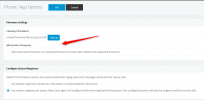
Under the Phones<<Options you do have the option to use an alternative firmware but note that this is not supported:

1701075374273.png
 
That option is ofcourse enabled. However, nothing happens if we try to push the firmware through the management console. Is there any way to manually download the firmware and push it to the devices ourselves?
 
The 3CX Supported Firmwares are automatically provided from the management console.
Any 3rd party firmware will not be pushed from the management console. You can download it from your source and check vendor documentation of how to manually update the firmware on each device.
 
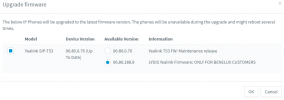
What do you exactly mean? I have two options for the firmware now. If I want to push 96.86.188.9 it doesn't work. Nothing happens. How do I extract this firmware from 3CX so I can push it manually? Is it stored somewhere locally in the filesystem?

yealink.png
 
After pushing the firmware the phones do not reboot?
How are the phones provisioned?
 
One of the four Yealink T53's is setup as a router phone so it's acting as an SBC. The 3CX installation is remote. The phones do not reboot indeed. I do get the message that the firmware is being pushed to the phone but in reality nothing happens.
 
Is this a Windows or Linux machine?
 
This is a Linux machine. I've managed to find the location, might be handy for someone else in the (near) future: /var/lib/3cxpbx/Instance1/Data/Http/Interface/provisioning/<random_characters>/firmware/yealink. If I try to upgrade the firmware manually I receive the message on the Yealink webinterface: OEM version different.

It seems that I have to contact Lydis for this, I guess.
 
Yes this has to be checked with Lydis.
 
It doesn't matter wither this is a Windows or Linux machine.

When you push the generic firmware into a Yealink phone, you can not simply push the dutch firmware.
You should contact your vendor (Lydis), they can supply you with a recovery method to update the phones back to Dutch firmware.
They have a special website for these recoveries
 
We are also Dutch and never use the Lydis firmware, if you have "strange" issues on your phones, it is always fixed with a firmware update to the international firmware. So we would advice to only use the international firmware (from our experience).
 
Worth noting is that Lydis firmware currently does not let you use the phones as SBC/router phone.
 
Just finished installing the Lydis firmware and now the router phone doesn't seems to be supported. That's what I figured out, it indeed doesn't work. It appears to be online but phones are not connecting to it.I have reverted the default supported firmware that's made by 3CX to the SBC phone. I kept the rest on the Dutch firmware. So far so good, works fine except for the English SBC phone. Honestly, how can I sell this to my customers?
 
Last edited:
Any idea if Lydis firmware will support router phones in the near future?
 
Status
Not open for further replies.

Members Online Now

Forum statistics

Threads
111,832
Messages
589,282
Members
164,662
Latest member
DejanMDS