Unable to send SIP REFER for call transfers with Twilio

egarciapf

Premier Customer
Joined
Oct 3, 2024
Messages
17
Reaction score
1
Hello

We have an IVR where the caller selects option (2), then the call gets transferred to an external number of a sister company B. The main issue is that the sister company receives Company A's default caller ID instead of the original caller number.

When tracing the calls in Twilio, I can see 2 different calls. I spoke to Twilio tech support, and they confirmed that the only way to achieve this is by the PBX sending a SIP REFER of the call so it comes from a Twilio's verified number. In this case, there will be 2 calls a father and a child, but Twilio treats it as the same call.

I have tried several configurations here, tweaking the Caller ID control, but nothing works. What am I missing?

1749760420704.png
 
HI,

To forward a call externally and have the call show the original caller's number, you need to configure your 3CX system to allow for the original caller ID to be passed through. Here are the steps:

1. Configure Outbound Caller ID:- Ensure that your SIP trunk provider supports "Clip No Screening" or similar functionality, which allows the original caller ID to be presented on outbound calls.- You may need to enable the option “Allow Outgoing calls with a different number” from the "Settings" of your Sip Provider portal.
2. Set Up Call Forwarding Rules:- In the 3CX Management Console, navigate to the extension settings for which you want to configure call forwarding.- Go to the "Forwarding Rules" section and set up the rules to forward calls to an external number.- Ensure that the option to pass the original caller ID is enabled, if available.
3. Check SIP Trunk Configuration:- Verify that your SIP trunk is configured to allow the passing of the original caller ID. This might involve setting the trunk to use the "From: Display Name" or "P-Asserted-Identity" headers to pass the original caller ID.
4. Test the Configuration:- After setting up the forwarding rules and SIP trunk configuration, test the setup by making a call to the extension and checking if the forwarded call displays the original caller's number on the receiving device.

These steps should help you configure your 3CX system to forward calls externally while displaying the original caller's number. Make sure to consult with your SIP trunk provider to ensure they support the necessary features.

https://www.3cx.com/partners/sip-trunks/
https://www.3cx.com/user-manual/call-forwarding/
 
  • Like
Reactions: kmanley
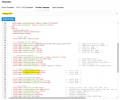
Thank you for your reply, K_SAK.After testing the suggested settings, the outcome remains the same. And down the rabbit's hole we went. I found that twilio's provider template has the options for Reinvite or Replace are disabled by default.

1749829358370.png
I have exported, modified, and imported the template but the template still shows these settings off. Any ideas here?

Thanks
Ernesto
 
Last edited:
As per the cal logs on 3CX this is what happens
1749835293746.png
As per Twilio tech support, they are waiting for the SIP REFER, and it does not happen, then 2 different calls occur
1749835459858.png
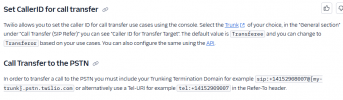
Twilio supports call transfer to PSTN 1749835617666.png
Now I wonder why 3CX declares the reinvite as disabled in the template. Any ideas how this flaw can be fixed?
 
Hi @egarciapf

Please note that there is no way to configure 3CX to send a REFER message to the provider. Transfers to the provider are done via Invites.
Also if you export a template, make changes to it and the import it back in that does not affect the template that is in the system. That only affects the trunk you just imported. If you want to see that your settings are indeed there just export and trunk again and check the xml file.
Having said that I would strongly recommend deleting the trunk you made with the changes and readding it with the default template. Enabling reinvites will cause more issues than it would solve.
Twilio does not support Clip no Screening so sending the originator caller ID is not possible.
 
Hi @egarciapf

Please note that there is no way to configure 3CX to send a REFER message to the provider. Transfers to the provider are done via Invites.
Also if you export a template, make changes to it and the import it back in that does not affect the template that is in the system. That only affects the trunk you just imported. If you want to see that your settings are indeed there just export and trunk again and check the xml file.
Having said that I would strongly recommend deleting the trunk you made with the changes and readding it with the default template. Enabling reinvites will cause more issues than it would solve.
Twilio does not support Clip no Screening so sending the originator caller ID is not possible.

YiannisH_3CX Thanks for your reply. If I understand correctly, there is no way from 3CX to send (using Twilio) the originator caller ID. I would like to confirm that, and also if you guys have any other provider suggestions to achieve this goal.

 
Thanks for your reply. If I understand correctly, there is no way from 3CX to send (using Twilio) the originator caller ID
There is way to send it. There isn't a way it will work with Twilio however. Originator caller ID will become increasingly difficult to find in the US with STIR/SHAKEN. Even providers that did support it are now starting to reject calls if specific requirements are not met.
Check our supported SIP trunk providers list and look for Clip no Screening support.
 

Latest Posts

Forum statistics

Threads
111,962
Messages
589,986
Members
164,867
Latest member
swegner