Unifying 3CX with Microsoft 365 - Single Sign-On (SSO) - Part 2 of 3

Status
Not open for further replies.

Keith Winhall_3CX

Product Communicator
Free User
Joined
Aug 3, 2021
Messages
60
Reaction score
67
Continuing with our 3 part video tutorial, last week, Stefan Walther, 3CX CEO, highlighted what initial steps are required to get your 3CX instance syncing with Microsoft 365. If you missed it, click here. Now with Part 2 in mind, Hands up who has ever wished that their car key and house key were the same? This short video highlights how the sync c...
Continue reading the Original Blog Post.
 
Last edited by a moderator:
We have the same issue, but even we can't log in with m365 in the admin console. It just loads and goes back to the login screen.

We tried disabling m365 and recreating the app. Our certificate is correct, the API rights are ok: https://prnt.sc/26tuh8w And status is ok: https://prnt.sc/26tuio8 All syncs are active, also for selected admin users. And synced with m365 is active: https://prnt.sc/26tukd2
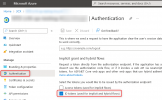
Can you check if this option is checked?
1644827994572.png

If it is and you still have the same problem, open a new thread in the following section:
https://www.3cx.com/community/forums/teams-365/
 
  • Like
Reactions: svenv
  • Like
Reactions: NickD_3CX
I would like to see this extended to Groups,
Filtering out every user on a large scale is tiresome when Azure Dynamic Security Groups can already do this
 
3CX Team,

Please fix the "Audit Log" any users with "Admin" logins and using SSO do not properly get captured in the "Audit Log" any changes made by an O365 delegated admin show up as if the "main" break-glass admin account is the one making changes.

Thus the audit log is unable to track changes made by O365 delegated admins. Check your 3CX systems, and please confirm my findings.
 
Status
Not open for further replies.