Update 5 Release Candidate Now Available

Thanks @N_G,

right now in the API integration page the save button is disabled for professional license. Based on what you said above it should be something like this, correct?

View attachment 47042
You can access the configuration API, but not via an API token. You need an extension with the correct access role
 
@guidoq
This has been discussed many times in this forum: use the credentials of an authorized user to log in to the 3CX Configuration API.

Think about it: everything you can do in 3CX Management via a browser is done via this API – using a user's credentials. You can also see this in the browser's developer tools.
 
as I said before I understand I can access using user credentials and will do so as I did in v18 if the API token creation stays as it is.
I'm not trying to find a way to use the API here, I'm just trying to figure out what the license limitations are if I want to use the best option
My point is that if the license limitation is applied to the use of the API and not the token creation, there should be the option to generate a token for the config API.

Again, if not possible I will authenticate with an extension credentials, although this:
- adds a lots of authentications to the audit logs
- possibly lets an user with the right permissions delete the extension if they don't know what they are doing.

So ideally, from a script or program, i'd prefer to authenticate using a token rather than user/pw
 
So ideally, from a script or program, i'd prefer to authenticate using a token rather than user/pw
Then at the moment: upgrade to ENT
 
  • Like
Reactions: N_G and Evolute IT
Then at the moment: upgrade to ENT
I'm not trying to be pedantic here, but this is not the point since in the post above was said that the configuration API is available for all editions.

I was just asking, since Nick said that probably the documentation is outdated or has an error regarding the Configuration API requiring an enterprise license, if the API token access page should be corrected as well or if this is the intended way and the config API can be authenticated only with user credentials

From my perspective, if the 3CX Configuration API is available in all license, wheras the 3CX Call Control API is available only on the enterprise, the license check shouldn't be done at the "Save" button level, but it should be only on the checkbox for enabling the 3CX Call Control API.
 
I'm assuming this new release will do nothing to change the user interface. The current interface is quite literally the worst interface in the history of UI. I'm not sure why you had to radically change the UI from 3.18. The current one now is just absolutely horrid and makes no sense whatsoever.

The I.T. departments at other organizations I have talked all agree and are baffled by the new structure.
 
as I said before I understand I can access using user credentials and will do so as I did in v18 if the API token creation stays as it is.
I'm not trying to find a way to use the API here, I'm just trying to figure out what the license limitations are if I want to use the best option
My point is that if the license limitation is applied to the use of the API and not the token creation, there should be the option to generate a token for the config API.

Again, if not possible I will authenticate with an extension credentials, although this:
- adds a lots of authentications to the audit logs
- possibly lets an user with the right permissions delete the extension if they don't know what they are doing.

So ideally, from a script or program, i'd prefer to authenticate using a token rather than user/pw
hello, is there any update on this?
@N_G
I'm asking because we're almost done migrating all our instances to v20 and we're beginning to miss the monitoring features we set up for our instances in v18.

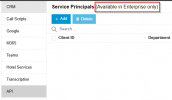
From my understanding from your post where you said that the Config API is available in PRO license, the limitation should be moved from here:

1747217788656.png

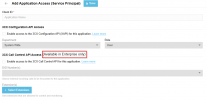
to here:

1747217838429.png

Is this going to happen in a future release, or should I just go ahead and use an extension to authenticate?
Thanks!
 
There were never any monitoring features in v18. All the monitoring in v18 is in V20. This is a XAPI API for configuration and the Call API - both are currently enterprise features 8SC and above.

If you are talking about system monitoring such as CPU usage etc we are working on this and you will be able to monitor centrally many instances. And it will be available for PRO also yes
 
The monitoring system was developed on our side with a grafana dashboard to have a quick overview of all our pbxs, with version an license info, backup history and other useful information. Also alerts set up for things like pbx, trunks and sbcs going down, possible suspicious calls, thresholds for x extensions going unregistered in a period of time. This gave us a proactive approach to issues.
I pulled the data from http requests authenticating with an extensions, as many other external applications did.

Regarding the API licensing, from this post:
and this
my understanding was that the XAPI API was going to be available in the professional licenses.

If this is not the case and as you said in your last reply, both APIs require enterprise licenses and 8SC+, is using the XAPI endpoints authenticating via user and password (which is working as of now) some kind of circumvention of the licensing limitations?
 
The XAPI requires an Enterprise license.
 

Latest Posts

Forum statistics

Threads
111,991
Messages
590,166
Members
164,929
Latest member
Cloudstar