Update 60+ Yealink T41S phones DSSkey / Linekey.

Status
Not open for further replies.

SBNGT

Customer
Joined
Dec 20, 2019
Messages
19
Reaction score
2
Hello, we are currently testing 3CX with Yealink T41S phones. We have created a custom provisioning template for the phones and have successfully been able to configure various settings on the phones such as backlight timeout, screensaver, directory name.

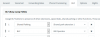
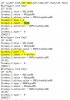
However, we would like to configure two buttons. One to put calls on hold, and one to transfer to a colleague. We have changed the the custom provisioning template as above but still it is not working. Any ideas?

I am using linekey type numbering found here.


1359513596
 
Why're you using custom templates to do these things?

Do the default templates not do what you want?

13597

13598

Yealinks have HOLD buttons on them anyway.
 
Last edited:
  • Like
Reactions: YiannisH_3CX
I am using a default config for a few reasons.

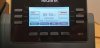
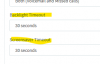
The main being that the 3CX logo seems to pop up every few minutes, regardless of backlight or screensaver timeout. I was able to stop it by changing the following from 2 to 0.

#Configure the logo mode of the LCD screen; 0-Disabled (default), 1-System logo, 2-Custom logo;
phone_setting.lcd_logo.mode = 2


Another being that I do not like the 3CX pbook text at the bottom of the phone display, and changed it to Directory.
 
Did you reprovision the handsets after making the change to the screensaver time?

Are they on latest FW?

it seems like a lot of effort for a cosmetic issue. Are you the customer or support?

problem with custom templates is, as 3CX evolves they become outdated and you're forever updating them.
 
Take out the if and endif lines.
 
Status
Not open for further replies.

Forum statistics

Threads
111,935
Messages
589,823
Members
164,815
Latest member
natedog