Updating 3CX On-Premise Installation

Cornel

Forum User
Joined
Feb 6, 2025
Messages
6
Reaction score
0
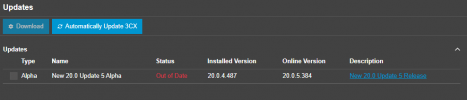
I recently installed Version 20.0 Update 4 of the 3CX Debian on-premise installation (trial version). I noticed that Update 5 Beta 2 is now available, but in the admin console, I can only see the alpha version of Update 5.
1738867657295.png
Could you please clarify the following:
  1. How can I ensure my system is kept up to date?
  2. Do I need to install the alpha version of Update 5 before installing the beta?
Thank you for your assistance!

Best regards,
Cornel
 
You need to install the alpha, then beta1 then beta2. That's how it works.

Otherwise wait for final release and it will show as a direct update.
 
Thank you for your detailed response and guidance. I followed the steps you outlined, installing the alpha version, then beta 1, and finally beta 2. Everything seems to function well so far, except for the "Secure SID" feature.

When I navigate to the "Secure SID" page, all the options are disabled. Although I can see the checkbox marked and the certificate names displayed, none of the settings are interactive.

Additionally, all my outgoing calls now fail with the following error:
sip:xx.xxx.xx.xx:5061 replied: Request Timeout (408)

For context, I am using Twilio Elastic SIP. Interestingly, if I change the port in the "Voice and Chat" menu -> Twilio trunk -> Server Detail to 5060, the call is successful. However, I am specifically aiming to ensure the calls remain secure.

Is this a change introduced in Update 5, or is it potentially a bug in beta 2?
I’d greatly appreciate any insights or troubleshooting steps you could recommend.
 

Members Online Now

Forum statistics

Threads
111,835
Messages
589,291
Members
164,668
Latest member
Infinity Network