Urgent Debian Security Update: OpenSSH Vulnerability

Agathocles Prodromou

CNO
Staff member
Joined
Aug 19, 2015
Messages
513
Reaction score
489

Attention 3CX Version 20 (Debian 12 Bookworm) users.​

A critical vulnerability has been discovered in OpenSSH (\"regreSSHion\" - CVE-2024-6387). Although nothing to do with 3CX, we’re pleased to have been able to demonstrate our ability to release this update within 24 hours. To protect your 3CX System, please update immediate...
Continue reading the Original Blog Post.
 
Last edited by a moderator:
We have automatic updates on our systems, but could specifiy the 3CX version number from where the fix is included in the builds?

Currently running:
Version 20.0 Update 1 (Build 731 Release)

thanks for your reply
 
Its a debian update, not 3cx. So if you are on automatic updates it will be installed automatic for you.
 
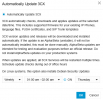
@bitn2 Thats true but it's based on the schedule so if you have anything other than daily, I suspect it would not update automatically unless OS updates are not included? None of the machines I check so far appear to be updated though on a weekly schedule Build 731:


1720006952215.png

1720007321917.png
 
Last edited:
  • Like
Reactions: bitn2
Is there a way to verify this Debian update actually installed? I enabled scheduled updates and see in Updates "You're up to date" "Last updated 06/24/2024 7:14 PM" but also see in Event Log on 07/02/2024 during the scheduled update window that the SIP Server service stopped and started again. I ASSUME "You're up to date" refers to 3CX and not Debian. I just want to verify this OpenSSH update actually installed.
 
Thats showing the 3CX Updates. This is something that concerns a package of the operating system. These types of updates will not show in the 3CX Admin Console.

Relax! We got you covered!

We just require automatic updates ON so we have the mechanism to allow the OS to be updated.
 
Peeps!

Please set your updates to DAILY to ensure that this will be triggered ASAP!
 
@NicholasP_3CX What about if the os update fails is there some sort of reporting we can look at to verify.

Not that we do not trust you "got us covered" but would like to know for this situation and future situations :cool:
 
@NicholasP_3CX So are you confirming OS updates follow the automatic schedule and are not fired nightly unless 3CX updates are set to daily?

And changing to daily now will that automatically trigger it to run immediately as we are in business hours now?

Seems that the two should be split as there are times that folks would want to hold off on 3CX updates because of a feature change but will need OS updates for security.
 
  • Like
Reactions: pmterp and ArneDery
Peeps!

Please set your updates to DAILY to ensure that this will be triggered ASAP!
Any chance you can confirm that V20 update 2 won't be switched from beta to release in the next few days? I want to switch auto-updates to daily to get the Linux fix but would rather not get the 3CX update unexpectedly.
 
Hosted by 3CX: Taken care of by 3CX staff members, so if there is an issue they will resolve it, as you do not have access to SSH.

Self hosted / On Premises: Log files are created for any updates.
 
The updates are done automatically during the selected time frame.
 
Is there a way to verify this Debian update actually installed? I enabled scheduled updates and see in Updates "You're up to date" "Last updated 06/24/2024 7:14 PM" but also see in Event Log on 07/02/2024 during the scheduled update window that the SIP Server service stopped and started again. I ASSUME "You're up to date" refers to 3CX and not Debian. I just want to verify this OpenSSH update actually installed.

If apt policy openssh-server returns

Bash:
openssh-server:
  Installed: 1:9.2p1-2+deb12u3
  Candidate: 1:9.2p1-2+deb12u3

Then you have the updated package.
 
@Agathocles Prodromou Since several systems were not set to daily, they did not update can we run ap-get update via terminal and suffer no repercussions on the 3CX side so we can get it immediately updated?
 
Didn't get any responses yet on above question about apt-get update, but saw that V20 U2 RC was out so pushed that and did get 1:9.2p1-2+deb12u3 loaded which was not installed before when checked but as you can see was only loaded as a candidate and not install, also performed a reboot.

Any suggestions on whether we should manually elevate?

Installed: 1:9.2p1-2+deb12u2
Candidate: 1:9.2p1-2+deb12u3
Version table:
1:9.2p1-2+deb12u3 500
500 http://repo.3cx.com/debian-security/2002 bookworm-security/main amd64 Packages
*** 1:9.2p1-2+deb12u2 500
500 http://repo.3cx.com/debian-security/2002 bookworm-security/main amd64 Packages
100 /var/lib/dpkg/status
1:9.2p1-2+deb12u1 500
500 http://repo.3cx.com/debian/2002 bookworm/main amd64 Packages
1:9.2p1-2 500
500 http://repo.3cx.com/debian/2002 bookworm/main amd64 Packages
 
Trying to get desk cleared before the holiday, we can confirm that apt-get update and apt-get upgrade worked to get 1:9.2p1-2+deb12u3 installed for on prem and no updates happened to the 3CX Version. Perhaps this method will be acceptable for those who do not want to set 3CX automatic updates to daily for reason previous stated but do want os updates run daily maybe via a job.
 
  • Like
Reactions: ArneDery

Forum statistics

Threads
111,991
Messages
590,167
Members
164,929
Latest member
Cloudstar