User-Grayed out

Status
Not open for further replies.

halziyani

Customer
Joined
Feb 14, 2024
Messages
4
Reaction score
0
I hope this finds all members Well

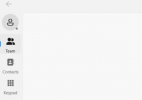
We are witnessing an issue where user extensions, which use computer applications and mobile applications, are being grayed out. They can still receive calls, but Teams section on app does not contain any other extension, and the status is grey.

To solve this issue, the user logs into his web portal and reprovisions the mobile by scanning QR and computer apps. However, please keep in mind that the web portal is working.

We appreciate your support on this. We are on version 20.


Regards
 
Hi there.
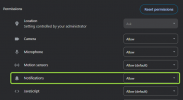
It should be the case with the notification, ensure that it is allowed:

1714461980387.png
 
Hi there.
It should be the case with the notification, ensure that it is allowed:

View attachment 41216

Dear OlegR_3CX
Thank you for your prompt reply.


Just to clarify, the reported issue is not related to notifications. What we have noticed is that users are appearing as grayed out on both mobile applications and computer applications.


From my understanding of your reply, you believe it's a permission issue with the mobile application, which is also impacting the computer applications. If a user only has the computer application, will they encounter this issue as well? We have migrated to CX3 this week and need to ensure that we have resolved the issue.


Thank you.
 

Attachments

  • User.png
    User.png
    12.9 KB · Views: 14
So if your user uses WebClient/PWA you will need to check notifications.
Can you please clarify, are you saying that you have 1 user who uses the mobile application and the other on the NEW Windows app, and the mobile application is not available there?
 
So if your user uses WebClient/PWA you will need to check notifications.
Can you please clarify, are you saying that you have 1 user who uses the mobile application and the other on the NEW Windows app, and the mobile application is not available there?
Basically, we have users relying on the Windows application V 20.0434.0 while also using applications on mobile devices running Android and iOS. Suddenly, their status will appear grayed out, and when they click on Teams, nothing shows up. To solve this issue, the user will log into their account from the Chrome browser and then go to apps to provision the Windows application as well as the phone application.

Once provisioning is completed, the status returns to normal, and all contacts and teams are loaded. However, the issue reoccurs after some time, and we have to repeat the above process again.

My question is, on which application should we check notifications if you think this is the root cause of the gray-out issue?
 
Kind Reminder

Regards
 
Status
Not open for further replies.

Forum statistics

Threads
111,953
Messages
589,910
Members
164,845
Latest member
tdzski5