- Joined
- Dec 2, 2021
- Messages
- 43
- Reaction score
- 5
Greetings,
Let me describe the setup first as I suspect it may have something to do with the problem:
With the user's previous phone system, they had a method of changing where inbound calls were being directed to by the push of a button. This allowed the receptionist to send calls to another receptionist at will when she was going to be away for a while. Two different users had the ability to change the destination of the main number. To accomplish this, I setup a special extension which forwards calls to one extension or another depending on the "status" of that extension and then granted multiple people access to that account. The main number rings this special extension and then it is forwarded to the appropriate user depending on its current status. This seems to work well.
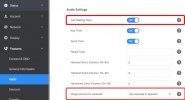
Now, the issue that we are experiencing is that the main receptionist user claims that, if she is on a call, there is no sound in her ear or on the phone that indicates that another call is coming through. The phone itself indicates this visually and so she can pickup that second call if she notices that the phone is ringing, but there is no sound. Naturally, she is afraid of missing calls if she is occupied. What would cause this behavior? Are there any options I can check? Is my method of forwarding calls from some other extension causing this? Any possible solutions?
Let me describe the setup first as I suspect it may have something to do with the problem:
With the user's previous phone system, they had a method of changing where inbound calls were being directed to by the push of a button. This allowed the receptionist to send calls to another receptionist at will when she was going to be away for a while. Two different users had the ability to change the destination of the main number. To accomplish this, I setup a special extension which forwards calls to one extension or another depending on the "status" of that extension and then granted multiple people access to that account. The main number rings this special extension and then it is forwarded to the appropriate user depending on its current status. This seems to work well.
Now, the issue that we are experiencing is that the main receptionist user claims that, if she is on a call, there is no sound in her ear or on the phone that indicates that another call is coming through. The phone itself indicates this visually and so she can pickup that second call if she notices that the phone is ringing, but there is no sound. Naturally, she is afraid of missing calls if she is occupied. What would cause this behavior? Are there any options I can check? Is my method of forwarding calls from some other extension causing this? Any possible solutions?