


- Joined
- Aug 18, 2021
- Messages
- 53
- Reaction score
- 10
Hello,
I have a problem when running the user script.
I get an error back with this query:
Set-CsUser -Identity *.*******@******.com -OnPremLineURI "tel:+49*************;ext=21" -EnterpriseVoiceEnabled $true -HostedVoiceMail $true
$users_ids = @(*.*******@******.com@******.com")
d6b83816-dc2c-438e-accc-14cd0c108c99
96905a9a-a059-4f53-a7b7-037138a229ae
5d63174a-82cf-4f5f-bb57-7f644668924c
WARNUNG: OnPremLineURI will be deprecated. Please use LineURI to update user's phone number.
PS C:\Windows\system32>
The phone number in the script is identical to the user's office number.
The execution of the dialing plan script works without problems.
Calling policies and dialing plans are also set.
Calling policy at the user is also set - dialing pad is visible in Teams.
The licenses should also be correct: (sorry it's german)

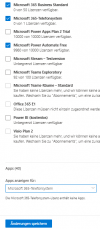
Direct routing also seems to work.

Do you have any other ideas?
Regards
fabs
I have a problem when running the user script.
I get an error back with this query:
Set-CsUser -Identity *.*******@******.com -OnPremLineURI "tel:+49*************;ext=21" -EnterpriseVoiceEnabled $true -HostedVoiceMail $true
$users_ids = @(*.*******@******.com@******.com")
d6b83816-dc2c-438e-accc-14cd0c108c99
96905a9a-a059-4f53-a7b7-037138a229ae
5d63174a-82cf-4f5f-bb57-7f644668924c
WARNUNG: OnPremLineURI will be deprecated. Please use LineURI to update user's phone number.
PS C:\Windows\system32>
The phone number in the script is identical to the user's office number.
The execution of the dialing plan script works without problems.
Calling policies and dialing plans are also set.
Calling policy at the user is also set - dialing pad is visible in Teams.
The licenses should also be correct: (sorry it's german)
Direct routing also seems to work.
Do you have any other ideas?
Regards
fabs
Last edited:


