User-specific office hours

SSCI

Bronze Partner
Joined
Jan 19, 2026
Messages
12
Reaction score
8
Hello All,
Hoping to get some help!

We are trying to set up specific office hours for a user, but it does not seem to be taking effect. The user is still receiving direct and queue calls.
Based onthe settings, users should only receive the calls during the office hours defined and ignore the department office hours. Any input on this?
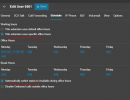
1768845843990.png

Thank you,
 
Hi @SSCI

Based on the screenshot after 11:00 AM passes, the extension should change status to DND. Did this happen, or is the extension still set on Available?
 
Hi @SSCI

Based on the screenshot after 11:00 AM passes, the extension should change status to DND. Did this happen, or is the extension still set on Available?
Hi NIikolas,

Yes, the extension is still active and receiving calls.

Thank you,
 
Hi NIikolas,

Yes, the extension is still active and receiving calls.

Thank you,
If you have set the office hours for this user after 11:00 AM, which means that you configured it after the designated office hours have passed, it is better to restart the PBX services so that the changes take effect. Go to Dashboard >> Services >> select all services and click restart. After the services are running again, check if the extension is now on DND.
 
That's right, I did the office hours set up after the designated office hour passed. Restarting the services has fixed the issue
Thank you.
 
  • Like
Reactions: KyriacosS_3CX
That's right, I did the office hours set up after the designated office hour passed.
Thank you.
We are glad to be of assistance
 
Do we need to restart the services every time we make any changes to user-specific hours?
 
Do we need to restart the services every time we make any changes to user-specific hours?
If the changes are made after the designated hours, then you need to restart services, but if you make a change before the designated office hours, then no, as soon as the time of the configured office hours comes, then changes will apply automatically.
 
  • Like
Reactions: KyriacosS_3CX
Hi,

Just in case it was not clear, the Service reload is done if you need immediate effect - otherwise just wait for the next time bracket to come and it will switch accordingly.
On a system where a service reload is not possible but a change needs to happen asap, add a small IN/OUT of office period of a couple of minutes that is after the current time and that should do it - then you can go ahead and remove this extra period.
 
  • Like
Reactions: SSCI
On a system where a service reload is not possible but a change needs to happen asap, add a small IN/OUT of office period of a couple of minutes that is after the current time and that should do it - then you can go ahead and remove this extra period.
maybe 1 min. break time ...
 
  • Like
Reactions: fxbastler
We are glad to assist you!
 

Forum statistics

Threads
111,953
Messages
589,914
Members
164,849
Latest member
BillyAkansel