User voice mail message

rheylens

Free User
Joined
Oct 11, 2024
Messages
6
Reaction score
0
Hello,
It is possible in the GUI to set the user voice mail annoncement message but is there a way (gui or SSH) to set up the audio file for the user name ?
If the user name audio file is not set the fonction (IVR) call by name is not working for that user (user not found).
Any ideas :)
 
The Call by name feature is activated on a user when they go into their own voicemail, and record a self identificaion message.

Log in to voicemail
Press 9 for Options
Press 5 to record a new self identification prompt
Speak the name (it is best for the user to record this themselves, as it is a SELF IDENTIFICATION prompt) and press #
Press 0 to save the message.

This will now activate the call by name on this user.

The self identification prompt will only p[lay when there are 2 people with the same name code.

For example SMITH = 764. If there are 2 people named Smith, or any other variation of the 1st 3 digits that coincide with 764, then the PBX will play back each individual prompt with a code from 0-9 so the caller can identify the user internally.
 
Hello, tks for this feed back the question was more if the system admin (owner) can set up the audio name file ? Several user do not set it up. And i will also premit the have a certen audio uniformisation
 
The self identification prompt has a very specific filename. It is self_id_prompt.wav

It should remain as that in order to work properly.
 
Where is it located ? Regarding your replay i suppose the only way for the admin to set it up in beaflf of a user si to do it in the CLI of the server.
 
Ultimately, the user should do this. It is a way that the caller can identify them by their own voice. The call by name is an opt in. This does not prevent someone from dialling the extension number of a user and reaching them.

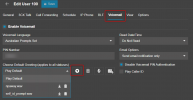
You can see if a user has this active in the voicemail tab of their extension

1740656684845.png
 
Tks for the information. As i mentioned some user do not respecte the company policy and we want to keep a global voice harmony.
Anyway, if someone is wandering the same kind of question, je file is located here /var/lib/3cxpbx/Instance1/Data/Ivr/Voicemail/Data/000/self_id_prompt.wav (where 000 is the extention number)
Take care file format (https://www.3cx.com/docs/converting-wav-file/)
Shoud be nice to have the possibility to set this up in the GUI
 

Members Online Now

Forum statistics

Threads
111,835
Messages
589,289
Members
164,668
Latest member
Infinity Network