V12.5.26-Calling via LTE fails for one account

Status
Not open for further replies.

patrickrivard

Joined
May 29, 2008
Messages
104
Reaction score
0
Device Info
-------------------------------------------------------
Phone Model: [LG Nexus 5]
Firmware Version: [5.1]

Issue Info
-------------------------------------------------------
I have two extensions configured on my Nexus 5
Both extensions work perfectly on local network.
One of them works via LTE, the other does not.
I have programmed them both either in a manual fashion or via "Welcome Email" with no luck for one of them every time....
I have also use the "Reprovision Phone" and "Reset Reprovision" button while connected on the local network, but still no luck...
I have verified every parameter of each account on the phone to make sure they are all the same...
==================================
Any constructive comments are welcome.

Thank you
 
Are these extension from the same PBX?

If you have confirmed that all settings, other than the extension/password (unique settings to each extension), are exactly the same, then I would look at the 3CX Server log and compare a registration (attempt) from each extension.
 
Leejor, Thank you for your input.
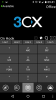
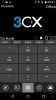
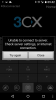
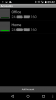
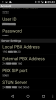
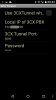
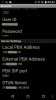
To answer your questions; yes, they are from the same PBX and to clarify further I'm attaching screen shots from the phone and the Server logs below.
As you will see, when outside the LAN, on the Cell Network (LTE), one extension registers but the other does not. It does not even show on the server logs. (Attachment, 150417_3CX-log_x)

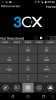
Troubleshooting further, I tried to set the "Local PBX Address" to our "External PBX Address" and it "Registers" right away, but it does not "Connect" to the "Presence" it shows as being "Disconnected" (On top Left). It loops on "Connecting..." "Disconnected".
(Screenshot_2015-04-17-10-29-58)

So, unless I'm totally wrong, it appears this issue is related to a "Bug" in the mobile app and should be address by 3CX...
 

Attachments

  • Screenshot_2015-04-17-09-40-47.png
    Screenshot_2015-04-17-09-40-47.png
    162.2 KB · Views: 5,461
  • Screenshot_2015-04-17-09-41-19.png
    Screenshot_2015-04-17-09-41-19.png
    159 KB · Views: 5,461
  • Screenshot_2015-04-17-09-41-51.png
    Screenshot_2015-04-17-09-41-51.png
    159.6 KB · Views: 5,461
  • Screenshot_2015-04-17-09-42-40.png
    Screenshot_2015-04-17-09-42-40.png
    165.4 KB · Views: 5,461
  • Screenshot_2015-04-17-09-42-44.png
    Screenshot_2015-04-17-09-42-44.png
    164.6 KB · Views: 5,461
  • Screenshot_2015-04-17-09-43-00.png
    Screenshot_2015-04-17-09-43-00.png
    69.5 KB · Views: 5,461
  • Screenshot_2015-04-17-09-43-23.png
    Screenshot_2015-04-17-09-43-23.png
    159.4 KB · Views: 5,461
  • Screenshot_2015-04-17-09-43-35.png
    Screenshot_2015-04-17-09-43-35.png
    112.1 KB · Views: 5,461
The rest of the attachments...
 

Attachments

  • Screenshot_2015-04-17-09-43-48.png
    Screenshot_2015-04-17-09-43-48.png
    165.5 KB · Views: 5,460
  • Screenshot_2015-04-17-10-29-58.png
    Screenshot_2015-04-17-10-29-58.png
    158.7 KB · Views: 5,460
  • 150417_3CX-log_x.txt
    150417_3CX-log_x.txt
    1.2 KB · Views: 102
There should be no difference in behaviour between two extensions, when one works and the other doesn't, if..

the common network settings are all correct and identical
the unique extension settings/password are correct
In the 3CX PBX extension settings, the extension is permitted to register remotely.

Are you using the Tunnel, or not?

Disconnected/Available, Presence status (upper left corner) requires that port 5060.5061,( this may have changed in the most recent version).

I question why you are using the PBX IP:port in the STUN setting, why not just leave the default (3CX stun server) in there?

I find that if a phone never uses the Tunnel, nor registers on the same LAN, then the local IP is not needed. that said, depending on the location indicator (small house, or office building), i can see that playing around with the IP in these field could cause the phone to register and indicate an incorrect location.

The big question is why does the extension not registering, not even show in the 3CX log? Where is the registration attempt going? Even if the extension credentials were incorrect, there should be something showing.
 
Leejor,

Yes, in the 3CX PBX extension settings, the extension is permitted to register remotely.
Yes, the Tunnel is set up and using it.
Ports 5060.5061 have nothing to do with this issue, as it does work for one and not for the other... Plus these ports are opened.
The automatic config sets the PBX IP in the STUN setting. But once again why would it work on one and not the other...

I really appreciate your input, but I think this is a real problem and needs to be looked at by 3CX...

Thanks
 
I'm not certain that this is a 3Cx issue. I'd think that there would be a lot more problems showing-up, if it were. I have multiple accounts on a could versions, on multiple android platforms, and once set-up, all work as expected.

Lets narrow this down a bit, and correct me if any of my assumptions are incorrect.

One extension is not working, always that same one. Has this extension been tried on another device, Android or Windows, and used remotely?

You are always using Tunnel mode? Does it work when not using Tunnel?

Does using WiFi (remotely), rather than LTE, make any difference?
 
Status
Not open for further replies.

Members Online Now

Forum statistics

Threads
111,832
Messages
589,284
Members
164,662
Latest member
DejanMDS