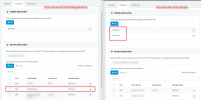
First of all, make sure the License has been activated properly after the upgrade.
On both 3CX installations, go to Settings --> License and hit the "
Refresh License Key Information" button, then make sure that the correct information appears, and of course that the license keys on both systems
is at least Pro or above.
It goes without saying, both 3CX installations need to be in the same version, not that one is V18 and the other is V16. Same Major Version and service pack.
If neither of the above help, then you need to check the bridge settings, they should look like this:
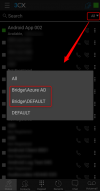
Assuming that the Presence Links and ports are correct, if you have it like this, in the Android app and any other 3CX app, the bridge connections will appear:
If after all of the above, you still don't see the options, please tell us the exact version of both PBXs (from the Dashboard on the right) as well as what version of the Android app you are using.