- Joined
- Dec 29, 2021
- Messages
- 73
- Reaction score
- 16
greetings all
Little by little, we're modifying contact info to add mobile numbers, and I ran some test.
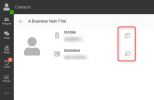
It looks like if a new contact is created with two numbers then saved, the default number showed when we search for a contact is the MOBILE 1. Click on the more option, and we can see "Send SMS to xxxxx" which would be the mobile 1 number. There is no way to call the "Business" number.
If a new contact is created only with a business number, then edited to add a MOBILE 1 number, then the default number is the business number.
A click on the more option will show "Send SMS to xxxxxxx" <- which is the Business number.
It would be great to have a little fix about this one: Display Business number if it is filled by default. Button more then would show "Call Mobile1" (and Call mobile2 if it exist), and "Send SMS to " using the MOBILE 1 by default, and not the Business number.
If you think business numbers are going to use SMS (eg if they have 3CX), then add multiple options under the more.
Open to suggestions and comments
Little by little, we're modifying contact info to add mobile numbers, and I ran some test.
It looks like if a new contact is created with two numbers then saved, the default number showed when we search for a contact is the MOBILE 1. Click on the more option, and we can see "Send SMS to xxxxx" which would be the mobile 1 number. There is no way to call the "Business" number.
If a new contact is created only with a business number, then edited to add a MOBILE 1 number, then the default number is the business number.
A click on the more option will show "Send SMS to xxxxxxx" <- which is the Business number.
It would be great to have a little fix about this one: Display Business number if it is filled by default. Button more then would show "Call Mobile1" (and Call mobile2 if it exist), and "Send SMS to " using the MOBILE 1 by default, and not the Business number.
If you think business numbers are going to use SMS (eg if they have 3CX), then add multiple options under the more.
Open to suggestions and comments