v20 Automated Recording Archiving not working, manual does

johnporteous

Premier Customer
Advanced Certified
Joined
Sep 29, 2022
Messages
58
Reaction score
9
Since moving to v20, we've found that the automated call archiving no longer runs as it used to in v18; now it must be done manually by clicking Move to Archive.

We auto archive all call recordings older than 1 day to Google Cloud and this ran smoothly until v20 was released. The manual action shows the connectivity and settings are correct, and the auto clean is off. Has anyone any idea why this happens now?
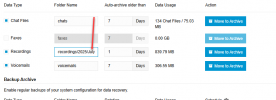
 
Hmm, from the screenshot the Recordings does have a slash after 2025. If after your last changes it fails, see if removing that slash is the key.
Yes it does, because after 2025 there is another folder which ends without a slash.

1753772723279.png
 
  • Like
Reactions: KyriacosS_3CX
OK, clear, at least one thing eliminated. Let's way for the next auto-run result.
 
Unfortunately the auto archive didn't work once again, on all 4 PBXs; manual Move to Archive still works. The remaining v18 PBX continues to run the schedule policy at 00:01 each day.
 
I am looking for similar resolved issues or references to make suggestions, but so far nothing that matches is coming up. You can open a ticket if you wish, for someone to take a direct and deeper look, or wait in case someone in the community has any other suggestions to try.

The only thing I have in my mind as maybe worth trying is to simplify that folder name, make it just a single word, no paths, and see if it makes a difference, just in case.
 
It does seem a tad strange that I have this and on 4 completely unique PBX instances. It's no great shakes because I can archive them manually each day but it would be nice to have a solution at some stage.
I'll try the new simplified folder & path, as you say...you never know!
 
  • Like
Reactions: KyriacosS_3CX
Any chance you are hosting them all on the same VM cluster and Google is throwing a hissy fit because it sees too many from the same IP at once? Also is the time on the servers correct, perhaps something triggers wrong in the key exchange, but that would break the manual archiving too..
 
  • Like
Reactions: Evolute IT
No, they are all standalone VMs. I suppose I could try staggering the timings.
Times are correct, and weirdly they work on v18 PBXs. This did cross my mind a couple of days ago; v20 3CX is set to UTC right?
 
Server time is down to the region you chose at installation, and admin panel time will in general be the Users Departmental time, with some logs following UTC for consistency.

Archiving should be on server/PBX default time.
 
  • Like
Reactions: Evolute IT
Tried leaving it for 2 days again to make sure but all 4 v20 PBXs remain non-archiving. I guess I'll just have have to click Move to Archive each morning.
 
Please check DM, I provided the evidence from your logs that it does indeed work as expected.
 
@johnporteous ,

Do follow up on ivan's DM - but just to mention for anyone following, don't do a manual push but leave it for two days, the schedule should run. Manual "resets" the timer, so when the scheduled run comes, it doesn't find something to process.

 
Please check DM, I provided the evidence from your logs that it does indeed work as expected.
However it doesn't mark them as archived.
 
@johnporteous ,

Do follow up on ivan's DM - but just to mention for anyone following, don't do a manual push but leave it for two days, the schedule should run. Manual "resets" the timer, so when the scheduled run comes, it doesn't find something to process.

Sorry for the slow reply, I am looking at this inbetween work task. However I'm still not convinced because the recordings are not being marked as archived, but they are on a manual archive.
 
Totally appreciate the help on this guys, I will just let it run as is and keep an eye on it especially archivings being marked.
@ivank - legend, appreciate your messaging with me on this.
 
Sorry for the slow reply, I am looking at this inbetween work task. However I'm still not convinced because the recordings are not being marked as archived, but they are on a manual archive.
For the list of recordings I provided to you, are they still showing as not archived?
 
They show archived because after 2 days and no markings, I thought it had failed again so ran a manual.
I'll leave over the weekend and cross reference the call recordings first.
 
No, your manual trigger archived all other recordings but not the ones in my list.
The message "XXX has been successfully archived" is written only when
a) recording has been successfully archived
b) marked as such in the DB
 
That's interesting. I'm going to go through them and work it out, I clearly didn't see that.
Don't stress any further on this Ivan, I'm good with it and I think leaving it all over the weekend will clear it all up.
 
I'll also watch to see what's archived next because this PBX is not used a great deal, mainly inbound, so the calls are minimal and I'll be able to see exactly what is being archived.
BTW quick question; I note that if you go to the Mngmt Console and want to download an archived recording, it works if recent. What is the timeline you can download an archived recording (to the cloud/Google) before it says it's not found?
 

Forum statistics

Threads
111,957
Messages
589,929
Members
164,861
Latest member
LewisJC