- Joined
- Apr 20, 2020
- Messages
- 13
- Reaction score
- 5
With V18, if you had an IVR that then routed to a Queue or RG, there would be two prepends in front of the caller ID first the name of the IVR then the queue.
For reporting purposes and also searching through recordings, this is something our customers use on a regular basis.
I have thoroughly looked through the forms. I cannot see anything specifically about this. (there are some posts that mention how you need to now select the pencil and name it for the DID name to show up, but this is specifically for a queue behind an IVR). It is only showing the initial IVR name that we have created by clicking the pencil, but there is no option for that in the queue or ring Group if it does not have a DID assigned. (we did try assigning a dummy DID and naming it, that is not show if the main IVR DID was called).
I feel like it might be obvious why we need this but just for some clarity; for example: we have a restaurant with an IVR: option 1 is new orders option 2 is reservations and option 3 is catering. The business owner would like to sort or search by New orders, also, the person answering the phone would like to know if it's a catering call or a reservation call so hoping we can figure this one out.
This is the logs just before the upgrade to v20
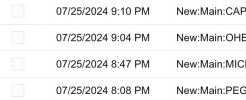
This is the logs today
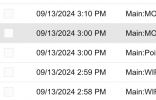
Has anyone else come across this or been able to figure out how to get Queue or ring Group name prepending in front of DID tag that is assigned to an IVR.
For reporting purposes and also searching through recordings, this is something our customers use on a regular basis.
I have thoroughly looked through the forms. I cannot see anything specifically about this. (there are some posts that mention how you need to now select the pencil and name it for the DID name to show up, but this is specifically for a queue behind an IVR). It is only showing the initial IVR name that we have created by clicking the pencil, but there is no option for that in the queue or ring Group if it does not have a DID assigned. (we did try assigning a dummy DID and naming it, that is not show if the main IVR DID was called).
I feel like it might be obvious why we need this but just for some clarity; for example: we have a restaurant with an IVR: option 1 is new orders option 2 is reservations and option 3 is catering. The business owner would like to sort or search by New orders, also, the person answering the phone would like to know if it's a catering call or a reservation call so hoping we can figure this one out.
This is the logs just before the upgrade to v20
This is the logs today
Has anyone else come across this or been able to figure out how to get Queue or ring Group name prepending in front of DID tag that is assigned to an IVR.