v20 Phone blacklisted after user "reset"

Status
Not open for further replies.

flash999

Premier Customer
Joined
Mar 27, 2019
Messages
48
Reaction score
9
We just upgraded to v20
After using "Reset" option for one of the users the user received a Welcome Email as expected but the problem is that the physical phone belonging to the user became blacklisted "Reason: Too many failed authentications!"
Are we doing something wrong ? Do we need to do some additional steps to make sure the phones would function ?
We can probably reset the phone to factory default, but we were hopping to be able to allow the user to change his password without the need to do anything with the physical phone
 
How did you upgrade?

You'll probably find the server URL for provisioning is pointing to the old URL:5001.

When you've done the reset, this resets all credentials including phone auth. Because phone isnt pulling config from new URL it wont update.

You need to log in to phone if you can and remove :5001 from URL or factory reset the phone.

I learned this the hard way by doing this to all phones across 2 sites :D
 
Last edited:
We do have FQDN and split DNS configured
When we add a new phone it allows to chouse between IP and FQDN
All our existing phones use IP
When I change it to FQDN for the ext that is already affected and unblock it it still gets blocked
Not sure what would happen if we first change it to FQDN and then "Reset" the user
The phone server and the phones are all on the same local LAN
 
When you reset an extension, we automatically inform the phone to reprovision itself with the new credentials.

If the phone is failing to reprovision for any reason, it will result in a ban (most likely what happened here).

So unban and check if the phone was able to actually reprovision in the first place so we can eliminate the possibility.

You will see the Auth ID in the phone UI matching the one in the extension settings.
 
We did some more testing
If we take any of our extensions and change something in the settings and then manfully press reprovision from 3CX it would not work
Credentials are correct and we can open the phone's web interface using "Device Web Console"
We do need to reprovision all of them to remove the port 5000 from provisioning URL
If we factory reset a phone it receives the new provisioning URL from DHCP Option 66 and after it boots we can reprovision it without any problems
Any idea why we can't reprovision ?
 
You mentioned port 5000, have you re-installed the PBX using different ports at some point (during transition from V18 to V20 perhaps)?

In that case once you manually reprovision all the phones so they can learn the new URL the problem goes away permanently.
 
We didn't change any ports intentionally.
We just followed the upgrade procedure.
Backup v18. Install v20. Restore backup.
 
How did you upgrade?

You'll probably find the server URL for provisioning is pointing to the old URL:5001.

When you've done the reset, this resets all credentials including phone auth. Because phone isnt pulling config from new URL it wont update.

You need to log in to phone if you can and remove :5001 from URL or factory reset the phone.

I learned this the hard way by doing this to all phones across 2 sites :D

I have not encountered this issue myself, but you're saying we would need to go through the config for every extension and manually remove :5001 from the Provisioning Link field on the IP Phone tab to prevent this from occurring?! Insane...that should be automated by the upgrade o_O

1720792483846.png
 
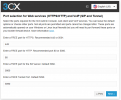
There's a wizard which will ask what ports you want during installation
The ports were never part of the backup, this is the method you would use if you want to change ports.

1720792604722.png
We show the current ones on the Dashboard which you can check now to confirm.

If the ports are different from the old ones, you will have to reset all the phones so they can pick up the new config URL from the system over Option 66 in your case.

You don't need to do them all at once since they all work for now, you can do them in batches if you prefer starting from any Hot Desking phones if you use any.
 
I have not encountered this issue myself, but you're saying we would need to go through the config for every extension and manually remove :5001 from the Provisioning Link field on the IP Phone tab to prevent this from occurring?! Insane...that should be automated by the upgrade o_O

View attachment 42541
In my case it was because I did a reinstall/restore as opposed to an upgrade. Im not sure if an upgrade to v20 handles this.
 
  • Like
Reactions: NCIA
  • Like
Reactions: NCIA
Upgrading v18 to v20 does not change ports.
There is an exception if you use Windows. The Windows build of 3CX will not upgrade to major versions like the Debian build does.

So you can install 3CX service packs fine on Windows, but when you want to jump from lets say V18 to V20, you have to reinstall using a backup. This was always the case, as we need to replace parts of the system that a service pack updater cannot do.
 
Sorry, yes, I meant direct/self-upgrades. All our clients except one we acquired. :) So on Windows one needs to specify the same port. And the "fix" there ought to be to uninstall and reinstall again using the "correct" ports, and restore a backup again?
 
In my case it was because I did a reinstall/restore as opposed to an upgrade. Im not sure if an upgrade to v20 handles this.

Okay, good to hear.
 
Status
Not open for further replies.

Forum statistics

Threads
111,952
Messages
589,896
Members
164,845
Latest member
tdzski5