


- Joined
- Aug 30, 2024
- Messages
- 1
- Reaction score
- 0
Hello.
Got a client who's hosted V20 (update 5) instance is randomly not sending voicemail attached emails. They leave a voicemail on a general unregistered extension to which it emails a distribution list. M365 email is setup and integration is running fine. An Exchange online mail trace shows no email is reaching the tenant during the time frame the call was made and voicemail was left (7:01am). Both the prior and succeeding voicemails left on the extension were successfully emailed. Here is a screenshot of the call log where it shows the voicemail being recorded. I've tested leaving voicemails myself and it worked every time.

Here's a screenshot of the mail trace:

I couldn't find anything in the sign in or audit logs for the 365 account that's used for email integration.
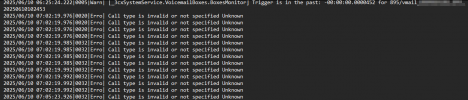
I can't find a reason for this happening. It will work fine for a while (weeks) and randomly occur. I've checked the system service log in the support package zip and nothing shows up for that time period other than a Call type is invalid... which doesn't make sense as the call log above shows the call was made and voicemail was recorded.
I understand medium or verbose logging might be needed but there's no telling when this happens again as it's very random.
Any insight is very appreciated.
Thanks!
Got a client who's hosted V20 (update 5) instance is randomly not sending voicemail attached emails. They leave a voicemail on a general unregistered extension to which it emails a distribution list. M365 email is setup and integration is running fine. An Exchange online mail trace shows no email is reaching the tenant during the time frame the call was made and voicemail was left (7:01am). Both the prior and succeeding voicemails left on the extension were successfully emailed. Here is a screenshot of the call log where it shows the voicemail being recorded. I've tested leaving voicemails myself and it worked every time.
Here's a screenshot of the mail trace:
I couldn't find anything in the sign in or audit logs for the 365 account that's used for email integration.
I can't find a reason for this happening. It will work fine for a while (weeks) and randomly occur. I've checked the system service log in the support package zip and nothing shows up for that time period other than a Call type is invalid... which doesn't make sense as the call log above shows the call was made and voicemail was recorded.
I understand medium or verbose logging might be needed but there's no telling when this happens again as it's very random.
Any insight is very appreciated.
Thanks!


