V20 SQL Reporting: Where is Agent Login/Logout activity stored

Gummies

Premier Customer
Advanced Certified
Joined
Apr 30, 2020
Messages
33
Reaction score
13
I am working on custom reporting for 3CX V20 and I've been reviewing the official CDR Guide.

While the cdroutput table is perfect for call-related data, it does not seem to include Agent Login/Logout events (queue presence). I need to replicate the "Agent Login History" report using SQL queries for a custom dashboard.

My questions for the community or the 3CX team are:

  1. Is agent queue activity (Login/Logout) still exposed in the PostgreSQL external database integration in V20?
  2. If so, which table replaces the legacy activity logs for this specific data? I am looking for the raw timestamps of when an agent toggles their "In/Out" status in a queue.
  3. Is this data part of the official SQL export schema, or is it now handled exclusively by the internal reporting engine?
Any insight into the V20 table structure for agent presence would be greatly appreciated.

Regards,
 
Hi @Gummies, if the agents are doing the login and logout via the application using the login/logout button, then this does not generate a CDR, in that case they would need to use the dial codes *62 and *63 so you can get this call log and run the custom dashboards.
 
If you download a system backup, go into the DbTables folder there is the callcent_ag_queuestatus.csv that contains the login/logout history. If you use the api to pull the list of users as well as queues (can also pull from the xml in the backup root folder) you can relatively build out a report that will provide the required data.

Another option is to run the reports manually (or pull via the api) to export the login history but this will only show the history of users currently a member of a queue. If an agent has been a member of a queue for the last year (and has associated events for logging in/out of the queue) but then are removed from said queue, running the report will no longer return their data even though there are technically events for them.


Either or will provide the necessary csv imports to push into a sql database for reporting/dashboard purposes.
 
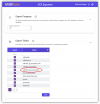
Another option is to look at our 3CX Exporter tool. We completely automate the replication process for the required table on a scheduled basis (default 60 seconds but you can choose the frequency).

1770403339859.png
Currently, 3CX only replicates the one cdroutput table, as you can see, we replicate 3 pages of tables on the frequency you choose. Frankly, the replication process previously was straightforward, but with the newer tables like the cdroutput table and several others, replicating only the new records has become far more complicated. We make efficient, reliable, performant replication a one-step set it and forget it process.
 

Forum statistics

Threads
111,953
Messages
589,914
Members
164,849
Latest member
BillyAkansel