v20 Team View

Status
Not open for further replies.

georgewillow

Premier Customer
Joined
Apr 13, 2012
Messages
42
Reaction score
8
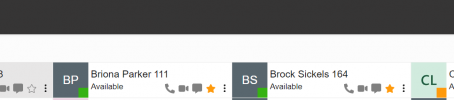
Not sure what the intended behavior here is but when a user searches for someone outside of their department they see a greyed out card and cannot see their presence. If the user subsequently favorites that person they are searching for it will pin the user to their "All" view which is great and shows presence information too. I'm not sure why you wouldn't show the presence while in the search results if all the user has to do is favorite that person to see the presence. I would prefer that any user could search the company and see the presence of someone outside of their department without having to favorite that person.

And just one more small UI issue. The favorite star won't change colors when you favorite someone in the search view. It just stays grey outlined. It does actually mark them as a favorite so when you back out of the search you see the favorited user with the yellow star.
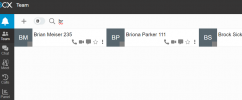
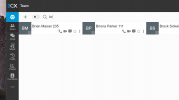
1711686650487.png
 
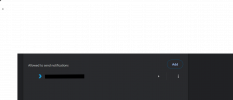
Can you please allow the notifications on your browser first and check?
 
Doesn't seem to change anything1711688039327.png
 
And just to demonstrate when they are favorited they show up with presence. 1711688120116.png
 
Can you please follow also the steps as per this post and enable the notifications?
 
I did. You can see the bell is gone.
 
Have you added the url as per post?
 
Yes, well it's already there if you allow notifications properly. I removed the text but you can see url is there1711688977931.png
 
Can you try from another browser or even reset the notifications and add them again?
 
Trust me we've rolled v20 out to hundreds of users and it's doing this on every browser and every user. I think you might be misunderstanding the issue. My users themselves are registered no problem with notifications enabled. They can make calls and all working just fine. I'm talking about a small issue where the user themselves searches for others in the company that are in departments other than theirs. Re-read my posts if that doesn't make sense.
 
Sorry if i misunderstood your issue here.
You said that between different departments you cannot see the presence information correct?
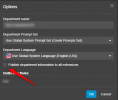
The department of a user that you cannot see presence, has the option below enabled?
1711689934421.png
 
Right well I don't really want to do that otherwise the default team view of "ALL" will show 200+ users.

Despite NOT having the "publish department information to all extensions" checked for every department users are able to search and locate other users in the company outside of their departments. When they search they see greyed out users (screenshots above). However if that user subsequently favorites a searched for user then they can see presence information just fine.

I'm just trying to point out a possible bug. If that is intended behavior than so be it. It seems like that is illogical.

The other very small issue was this:
"And just one more small UI issue. The favorite star won't change colors when you favorite someone in the search view. It just stays grey outlined. It does actually mark them as a favorite so when you back out of the search you see the favorited user with the yellow star."
This does seem to be a UI bug even though it's a small one.
 
For the presence when adding as favorite i will need to check and get back to you.
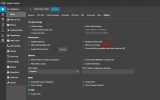
However since this is part of the 3CX Phonebook it will be shown unless the option to hide is enabled:
1711691443643.png

As for the favorite star, also i can see what you mean. Once you press it it does not change color but actually is added as favorite, correct?
 
@georgewillow just to clarify this behavior is expected as once the extension from another group is added as a Favorite, then you will be able to see the presence for this extension. In order to avoid this you need to Hide the extension for the 3CX Phonebook.
 
I would like to be able to see the presence in the search view WITHOUT have to add as a favorite.
 
In this case you have to set the Department to publish information to other groups, bit note this affect all the Department members.
 
Status
Not open for further replies.

Forum statistics

Threads
112,328
Messages
591,905
Members
165,483
Latest member
AshleyStokes