- Joined
- May 8, 2016
- Messages
- 12
- Reaction score
- 3
Hi,
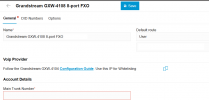
I finally upgraded two on-premise systems to 3CX v20. I did the migration directly from v18 to v20 update 4. These systems need FXO gateways because they are away from good internet. However, since the upgrade, I lost many important configurations for my four FXO gateways, including IP addresses and other settings.
Is this normal? Should I delete them and create them again?
Thank you
I finally upgraded two on-premise systems to 3CX v20. I did the migration directly from v18 to v20 update 4. These systems need FXO gateways because they are away from good internet. However, since the upgrade, I lost many important configurations for my four FXO gateways, including IP addresses and other settings.
Is this normal? Should I delete them and create them again?
Thank you