v20 Update 7 - Remote Storage Partially Configured Banner

kriley87

Silver Partner
Advanced Certified
Joined
Jul 24, 2019
Messages
108
Reaction score
22
Is there a way to hide this banner on the dashboard in the new update?

For deployments with a significant amount of local call recordings, this presents issues with transferring large amounts of data to offsite / cloud storage. Having a persistent banner about “improperly configured storage” feels excessive, especially when clients with backend access see it and assume something is wrong with their system configuration when there isn't.

For context, all of our 3CX deployments are protected by nightly VM-level snapshots, which fully cover our backup and disaster recovery requirements. We only use file-level backups to off-site FTP for the baseline 3CX configuration, not recordings.

Thank you.
 
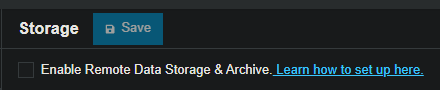
Regarding your question, this behavior is expected, as explained in the blog post. If you select only some items to archive, those items will stay visible and cannot be deleted. To fully remove this banner, you need to archive everything in the Storage section.

https://www.3cx.com/blog/releases/system-watcher-v20-update7/
 
  • Like
Reactions: NatalyS_3CX
My only reason currently for not using remote storage is that 3CX then loses the ability to manage retention for recordings and if we implement retention on the remote storage 3CX doesn't recognise when older recordings are deleted potentially leading to a situation where a client is trying to download a recording they see in 3CX but has actually been deleted on the remote storage due to exceeding retention. Is there a plan to do something about this?
 
I keep SFTP backups of everything, and it's worked great. a handful of clients do have access to pull recordings/reports. Would they be able to see the dashboard where, as far as I can see, seems to be the only place the banner is being displayed? Or, is it displayed in other places that they would be able to see it if the have a Supervisor or Manager role?
 
It's only on the dashboard.
 
We back up entire VM's with guest files for quick restore functionality, use Volume Shadow Copy for quick file recoveries and until U7 had the 3CX configurations both stored locally and DFS'd to other locations. Worked perfectly for many years. Now we MUST add another archive site (SFTP, Azure, whatever...) to support future updates with sub-folders (why this segmentation is necessary instead of a single zip file has not been explained.) Our call recordings go back 7 years, reside on separate drives and we're talking terabytes of data. This level of additional data backup has impact on both available storage and budget. Not to mention the extra recovery time of downloading from our SFTP site (we only have one) instead of a local restore.

Fax and voicemails are emailed to end users on arrival so there is nothing to backup. If these are the "Hi you've reached John and I'm not in right now..." vm recordings, they can be recreated quickly or pulled from VM backups. We don't need chat, fax or voicemail backups but have to define an empty folder so the red banner goes away?

The banner should disappear when this box is checked.

1761141548384.png
 
  • Like
Reactions: TheRambler

Forum statistics

Threads
111,954
Messages
589,921
Members
164,851
Latest member
DrunkeMeister