V20 Upgrade fails with "Invalid Backup File Invalid reply (Country)"

Status
Not open for further replies.

forrestdean

Premier Customer
Joined
Mar 28, 2019
Messages
26
Reaction score
3
Whenever I try to restore a 3CX configuration file that was created on 3CX version 18 that is installed on Windows Server 2019 to a new 3CX server version 20 installed on Debian Linux I get an error message saying "Invalid backup file", "Invalid reply (Country)".
 
Is the v18 running update 9a?

As a guess, I would take a look at the .xml file in the backup and see if it has a country field somewhere. If it looks wrong try to correct on v18 and create a new backup.
 
I looked at the 1963777904Db.xml file which is located in the root directory of the backup configuration zip file and found the following settings for country highlighted in bold:

<license>
<licensekey>MY LICENSE KEY</licensekey>
<company>MY COMPANY</company>
<contact>Forrest Dean</contact>
<email>MY EMAIL</email>
<phone>MY PHONE NUMBER</phone>
<country>US</country>
<reseller>MY RESELLER</reseller>
<adminemail>MY ADMIN EMAIL</adminemail>
</license>

Oh and yes I'm running 3CX version 18.0 Update 9 (Build 31)
 
Last edited:
Let me know if the fix we implemented works, Forrest.

Les
 
Check the country matches what is specified under customer.3cx.com too.
 
Let me know if the fix we implemented works, Forrest.

Les
Hi Les,

Yes, I was finally able to get past the Invalid reply (Timezone) error, but now it's moved onto a new error while trying to restore the configuration file to the new 3CX version. Now it's giving me "Invalid reply (OperatorVoicemail)" error. I'm currently researching that error now. It seems to move on to a new error after fixing the previous error. Apparently, I have quite a few parameters that need tweaking for this restore to work. ChatGPT couldn't find a solution from the .xml file I uploaded to it, but it suggested that I create a parameter called OPERATOR_VOICEMAIL with a value of 999, so I'm currently trying that to see if I can get past that error.

Do you by chance have an "OPERATOR_VOICEMAIL" setting in your parameters?

Thanks,

Forrest

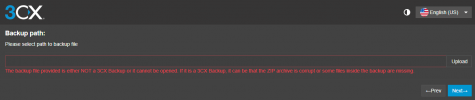
Update: Now every time I make a backup of the 3CX version 18 configuration and try to restore to the version 20 I keep getting the following error:

1727199884397.png

I'm not sure what's going on there.

UPDATE: Ok, so whenever I removed the OPERATOR_VOICEMAIL parameter I was able to get past the Upload part when trying to restore the configuration, but I still get the Invalid reply (OperatorVoicemail) whenever I try to go further. I guess I need to play around with parameters until I get it right.
 
Last edited:
Now every time I make a backup of the 3CX version 18 configuration
Are you using a SetupConfig.xml? This will not work. Or did you use a backup.zip? if backup.zip did you change anything within the xml? if so it will not work
 
Are you using a SetupConfig.xml? This will not work. Or did you use a backup.zip? if backup.zip did you change anything within the xml? if so it will not work
No, I didn't change any .xml files. I don't have a SetupConfig.xml that I'm aware of as I couldn't figure out where to find any .xml configuration files for 3CX other than the ones for individual phone manufacturers. I did use a backup zip file but I didn't make any changes to the .xml file in the root directory of the compressed file. I found out a while back that you can't modify the .xml files within the backup.zip file as that will also corrupt the backup file.

It seems the corrupted backup file is random. I've done about a dozen or so backups while trying to restore to the new version and most times the backup file is created with no problems, but it randomly gets corrupted during the creation process for whatever reason. I've noticed that I just have to keep doing the backup until it's not corrupted. It's a little frustrating since it takes about 7 minutes each time I do the backup, but I'm struggling through it.

Now I'm just trying to figure out what parameter I need to create for the Operator Voicemail.
 
Status
Not open for further replies.

Forum statistics

Threads
111,954
Messages
589,921
Members
164,851
Latest member
DrunkeMeister