Version 20.0 Update 3 issues - Backups

Mr F

Forum User
Joined
Sep 27, 2023
Messages
27
Reaction score
6
Since storage is going the way of the centralised route, i turned off backups to my Google storage bucket, so they are local and I will create a script to transfer them to my NAS, when creating a schedule I've noticed it re-enables the cloud storage option.
My issue here is that no backup ever seems to get created or uploaded to my bucket, my voicemails work correctly and get transcribed correctly but the backups never appear.

I was happy to keep them local but unfortunately when i set a schedule it never applies to the local backups and instead enables backup for my google cloud.

Is there a way to keep local backups with a schedule applied to local backups only?

Steps to reproduce:

See the screenshot below, test.zip exists locally in /var/lib/3cxpbx/Instance1/Data/Backups

1728549915011.png

I click "Schedule Backup" and enable the schedule

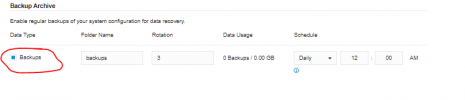
If i refresh the page I noticed my local backup was no longer listed, checked System > Storage and found the "Backups" option enabled for my Google Cloud Storage options
1728550089866.png
If I disable this option my local backups are shown again, enabling the scheduler on the "Backup" page re-enables the "Backups" option in the storage page hiding my local backups.


Thanks
 
Last edited:
>> My issue here is that no backup ever seems to get created or uploaded to my bucket
Any error events in the event log?
What happens if you try "Backup Now"?

>> Is there a way to keep local backups with a schedule applied to local backups only?
No, with remote storage on setting the schedule effectively switches on remote backups.
 
>> My issue here is that no backup ever seems to get created or uploaded to my bucket
Any error events in the event log?
What happens if you try "Backup Now"?

>> Is there a way to keep local backups with a schedule applied to local backups only?
No, with remote storage on setting the schedule effectively switches on remote backups.
Clicking "Backup Now" when remote storage backups is enabled - shows the dialog saying the backup is taking place and can be closed but no backup is ever created (I have waited 2 to 3 hours)
No, the only events in the event log are the "Success" events when a local backup was created
No failures or messages when trying to create a backup in the google storage bucket (Which does work for voicemail transcription correctly)

Any log file I could grep for warnings/errors?
 
Last edited:
Just to clarify (because you mentioned some script), you're using Google bucket as your remote storage and when you enable scheduled backups they never get into "backups" subfolder of your bucket and neither does manual backup when you try "backup now"? Could you share your Storage settings fully?
 
>> Any log file I could grep for warnings/errors?
Yes, SystemService log for scheduled and ManagementConsole for manual
 
Just to clarify (because you mentioned some script), you're using Google bucket as your remote storage and when you enable scheduled backups they never get into "backups" subfolder of your bucket and neither does manual backup when you try "backup now"? Could you share your Storage settings fully?
The script mentioned was because I wanted a separate storage area that was not using the centralised storage (like the previous version, I used google bucket for voice transcription and sftp for my backup location) I was going to write a bash script to manually copy them across.

If the schedule is not going to work with local backups I can get around this by automating running the 3CXBackupCmd to create a full backup and then transfer that using SFTP
Starting a manual backup when backups in remote storage off = Works
Starting a manual backup when backups in remote storage on = Does not work (I have tried using "/" and "Backups" as path options and no file has ever been created in my bucket.

screenshot below shows full remote storage settings

1728553262963.png
 
Last edited:
Please retry manual instant backup, wait for about 10 minutes, collect the logs and send to me. I'll try to figure out what's wrong.
 
Please retry manual instant backup, wait for about 10 minutes, collect the logs and send to me. I'll try to figure out what's wrong.
I ran a manual backup approximately 15 minutes ago, here are all of todays log entries from 3cxManagementConsole.log - The last entry is the only entry from [XAPI.BackupsController]
Code:
2024/10/10 01:43:24.988|0003|Warn| [ManagementConsoleJS.Controllers.LoginController] LoginException: User or password is invalid from (149.50.209.141)
2024/10/10 03:38:31.108|0040|Warn| [ManagementConsoleJS.Controllers.LoginController] LoginException: User or password is invalid from (149.50.209.141)
2024/10/10 07:11:07.290|0037|Warn| [ManagementConsoleJS.Controllers.LoginController] LoginException: User or password is invalid from (149.50.209.144)
2024/10/10 09:16:58.065|0023|Warn| [MyPhone.CallOwner] WebRTC: Client for session dc1b5d0b-bc66-8718*** is not found
2024/10/10 09:20:11.738|0029|Warn| [MyPhone.CallOwner] WebRTC: Client for session 5b2b832b-1607-ad9a*** is not found
2024/10/10 09:40:56.027|0046|Warn| [MyPhone.CallOwner] WebRTC: Client for session 54c32b0d-40df-4a2a*** is not found
2024/10/10 09:41:02.726|0046|Warn| [MyPhone.CallOwner] WebRTC: Client for session 74163092-62c0-0a41*** is not found
2024/10/10 09:42:54.604|0046|Warn| [MyPhone.CallOwner] WebRTC: Client for session c10544fa-7571-e956*** is not found
2024/10/10 09:43:21.828|0003|Warn| [MyPhone.CallOwner] WebRTC: Client for session 0a072579-0b0f-48d1*** is not found
2024/10/10 09:43:34.329|0003|Warn| [MyPhone.CallOwner] WebRTC: Client for session 8af76638-d275-f569*** is not found
2024/10/10 09:43:57.251|0046|Warn| [MyPhone.CallOwner] WebRTC: Client for session b8f8e993-2d17-f3b7*** is not found
2024/10/10 09:44:22.068|0038|Warn| [MyPhone.CallOwner] WebRTC: Client for session 045523ce-347d-4377*** is not found
2024/10/10 09:46:43.201|0049|Warn| [MyPhone.CallOwner] WebRTC: Client for session 898742ee-181f-64d2*** is not found
2024/10/10 10:35:26.598|0058|Warn| [ManagementConsoleJS.Controllers.LoginController] LoginException: User or password is invalid from (149.50.209.182)
2024/10/10 10:45:10.323|0064|Warn| [XAPI.BackupsController] A task was canceled.
 
Please retry with Verbose mode set.
As per your settings above, the backups should be created in /3cxvoicemail/backups. Something prevents this from happening.
 
Is there an email address or portal I can upload this log file?
(In verbose mode it contains quite a fair amount of sensitive information)

Thanks
 
We're seeing similar issues with SFTP to a local storage appliance after installing V20 Update 3.

I've checked just about everything I can think of off the top of my head, and looked around online to see if others have had similar issues, but nothing that they've formerly identified seems to do the trick to get it to work.

Currently the error we get when trying to run a manual backup is:
Your 3CX backup failed due to the following reason(s):
Client not connected.
And if we let it do a scheduled backup we get a more verbose error of:
Your 3CX backup failed due to the following reason(s):
Renci.SshNet.Common.SshConnectionException: Client not connected.
at Renci.SshNet.Session.SendMessage(Message message)
at Renci.SshNet.Session.Renci.SshNet.ISession.SendMessage(Message message)
at Renci.SshNet.Channels.Channel.SendData(Byte[] data, Int32 offset, Int32 size)
at Renci.SshNet.Channels.Channel.SendData(Byte[] data)
at Renci.SshNet.SubsystemSession.SendData(Byte[] data)
at Renci.SshNet.Sftp.SftpSession.SendMessage(SftpMessage sftpMessage)
at Renci.SshNet.Sftp.SftpSession.SendRequest(SftpRequest request)
at Renci.SshNet.Sftp.SftpSession.RequestWrite(Byte[] handle, UInt64 serverOffset, Byte[] data, Int32 offset, Int32 length, AutoResetEvent wait, Action`1 writeCompleted)
at Renci.SshNet.Sftp.SftpFileStream.Write(Byte[] buffer, Int32 offset, Int32 count)
at _3CX.Filesystem.SFTP.FixedSftpFileStream.Write(Byte[] buffer, Int32 offset, Int32 count)
at System.IO.Stream.CopyTo(Stream destination, Int32 bufferSize)
at _3CX.BackupRestore._3cxBackup.UploadTemptoDestination()
at _3CX.BackupRestore._3cxBackup.FinishingTask()

What we've tried so far:
  1. Run a backup manually to see if it's a scheduler problem. Result: failed, "Client not connected"
  2. SSH to the 3CX Debian VM and just double check nothing is wrong with the SSH key and user account. Result: Curling the SFTP location w/ the SSH key 3cx is set to use works fine.
  3. Tried to download a previous backup via Admin portal. Result: Success, downloading works
  4. Delete a previous backup via Admin portal. Result: Success, deleting works
  5. Tried switching from remote storage to local for backups. Result: backup succeeds
  6. Tried switching back to remote storage for backups. Result: backups fail again
  7. Tried restarting configuration server service and thereby all children services as well. Result: Still failing to run backups over SFTP
  8. Tried setting a parameter for `Force backups to temp file before uploading to remote storage` to `1` and restarting the configuration server service, as was found to be a solution by another user with the same Renci.SshNet error readout. Result: No change, still failing
  9. Checked that the SSH keys were the right OpenSSH format using Puttygen conversion method. Result: No change, still failing.
I'm not sure what might be the issue here as the VM can clearly access the remote storage location via SFTP and the SSH keys that are assigned to that connection. It just seems to be that it refuses to upload to the remote storage location.

I tried setting log level to verbose and running a backup to see what it prints out. Happy to DM it to someone, but it's got some calls being logged inside of it and I'd like to keep that private.

The part of the verbose logs that notes the stop/fault point is included here:

Code:
2024/10/15 13:47:37.965|0064|Info| [XAPI.Services.BackupService] Starting finishing task...
2024/10/15 13:47:37.965|0064|Info| [XAPI.Services.BackupService] Closing temp file stream
2024/10/15 13:47:38.513|0064|Info| [XAPI.Services.BackupService] Copying temp file to destination stream
2024/10/15 13:47:38.515|0064|Erro| [XAPI.Services.BackupService] Exception caught in 'FinishingTask()' at line 338
Renci.SshNet.Common.SshConnectionException: Client not connected.
   at Renci.SshNet.Session.SendMessage(Message message)
   at Renci.SshNet.Sftp.SftpSession.SendRequest(SftpRequest request)
   at Renci.SshNet.Sftp.SftpSession.RequestWrite(Byte[] handle, UInt64 serverOffset, Byte[] data, Int32 offset, Int32 length, AutoResetEvent wait, Action`1 writeCompleted)
   at Renci.SshNet.Sftp.SftpFileStream.Write(Byte[] buffer, Int32 offset, Int32 count)
   at _3CX.Filesystem.SFTP.FixedSftpFileStream.Write(Byte[] buffer, Int32 offset, Int32 count)
   at System.IO.Stream.CopyTo(Stream destination, Int32 bufferSize)
   at _3CX.BackupRestore._3cxBackup.UploadTemptoDestination()
   at _3CX.BackupRestore._3cxBackup.FinishingTask()
2024/10/15 13:47:38.792|0064|Info| [XAPI.Services.BackupService] Temp file is deleted
2024/10/15 13:47:38.793|0064|Info| [XAPI.Services.BackupService] Total time: 00:01:24.3237223
2024/10/15 13:47:38.793|0064|Info| [XAPI.Services.BackupService] Saving Object Model.Elapsed = 00:00:03.7748930
2024/10/15 13:47:38.793|0064|Info| [XAPI.Services.BackupService] Creating Mapping Table....Elapsed = 00:00:03.1112220
2024/10/15 13:47:38.793|0064|Info| [XAPI.Services.BackupService] Saving Call History.Elapsed = 00:00:27.7362332
2024/10/15 13:47:38.793|0064|Info| [XAPI.Services.BackupService] Saving MyPhone History.Elapsed = 00:00:14.4674592
2024/10/15 13:47:38.793|0064|Info| [XAPI.Services.BackupService] Saving Statistics tables.Elapsed = 00:00:06.7612905
2024/10/15 13:47:38.793|0064|Info| [XAPI.Services.BackupService] Saving Recordings table.Elapsed = 00:00:05.1209742
2024/10/15 13:47:38.793|0064|Info| [XAPI.Services.BackupService] Saving jwt tokens tables.Elapsed = 00:00:03.1057543
2024/10/15 13:47:38.793|0064|Info| [XAPI.Services.BackupService] Saving http Prompts.Elapsed = 00:00:39.4357971
2024/10/15 13:47:38.793|0064|Info| [XAPI.Services.BackupService] Saving IVR Prompts.Elapsed = 00:01:20.8509879
2024/10/15 13:47:38.793|0064|Info| [XAPI.Services.BackupService] Saving Voicemail prompts.Elapsed = 00:00:37.2415731
2024/10/15 13:47:38.793|0064|Info| [XAPI.Services.BackupService] Saving Voice mails.Elapsed = 00:01:23.4497870
2024/10/15 13:47:38.793|0064|Info| [XAPI.Services.BackupService] Saving CRM Integration.Elapsed = 00:00:00.0003419
2024/10/15 13:47:38.793|0064|Info| [XAPI.Services.BackupService] Saving Reports logo.Elapsed = 00:00:05.0667459
2024/10/15 13:47:38.793|0064|Info| [XAPI.Services.BackupService] Saving Recorded calls.Elapsed = 00:00:00
2024/10/15 13:47:38.793|0064|Info| [XAPI.Services.BackupService] Saving Phone provisioning files.Elapsed = 00:01:20.8056627
2024/10/15 13:47:38.793|0064|Info| [XAPI.Services.BackupService] Saving Fax Configuration.Elapsed = 00:00:36.7229647
2024/10/15 13:47:38.793|0064|Info| [XAPI.Services.BackupService] Saving Certificates.Elapsed = 00:00:09.7558414
2024/10/15 13:47:38.793|0064|Info| [XAPI.Services.BackupService] Saving Profile pictures.Elapsed = 00:00:22.0133194
2024/10/15 13:47:38.793|0064|Info| [XAPI.Services.BackupService] Saving Chat files.Elapsed = 00:00:37.1834068
2024/10/15 13:47:38.793|0064|Info| [XAPI.Services.BackupService] Saving Hotel Module data.Elapsed = 00:00:00.0002633
2024/10/15 13:47:38.794|0064|Info| [XAPI.Services.BackupService] Saving SSL.Elapsed = 00:00:00.0001158
2024/10/15 13:47:38.794|0064|Info| [XAPI.Services.BackupService] Backup test-6 created
2024/10/15 13:47:38.810|0064|Info| Sending email about backup is failed
 
Adding a parameter for ALWAYS_USE_TMP_FILE_FOR_BACKUP set to 0 has fixed the backup issue for me. Logs show it opening the SFTP session and writing directly to the remote SFTP session host. Thanks Ivank!
 
In one case our client upgraded to v20, then lost access to AWS for at least a month, and their FTP server went down - no way to restart.
As a workaround I turned off Remote Storage - yes completely.

This allowed local backups to continue, which we manually downloaded for the client.
Eventually we got access to AWS and restarted the FTP service, same IP Address, and remote backups were re-enabled.
 

Latest Posts

Forum statistics

Threads
111,963
Messages
589,998
Members
164,868
Latest member
swegner