Version 9 inatall on Server 2008 R2**FIX PROVIDED

Status
Not open for further replies.

pdq

Joined
Dec 3, 2009
Messages
82
Reaction score
0
Uninstalled version 8 on Server 2008 R2 with .net 4 and all other .net versions. R2 is x64 only.

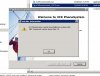
when I try to install version 9 RC1 I get the attached error.
 

Attachments

  • Capture.JPG
    Capture.JPG
    52 KB · Views: 1,557
Re: Version 9 inatall on Server 2008 R2

Did you install .NET Framework from Features on 2K8R2? It is not installed by default.
 
Re: Version 9 inatall on Server 2008 R2

Hi, you will need to install .net framework 3.5, by going to control panel , turn windows features and enable Microsoft .Net Framework 3.5. Then check for updates and restart your machine.

Then Install 3cx Phone System and restore or create your phone system.
Thanks and regards.
 
Re: Version 9 inatall on Server 2008 R2

That was it, thanx, I thought is was a defualt install similar to the.net versions in Server 2003 and Server 2003 R2.
 
Re: Version 9 inatall on Server 2008 R2

yes for .net always enable it from ctrl panel. Safest way.
 
Re: Version 9 inatall on Server 2008 R2

I see that now, its not the same with Win 7, Vista or Server 2003.
 
Re: Version 9 inatall on Server 2008 R2

on the same lines with win 7 and vista

2003 no. xp no
 
Re: Version 9 inatall on Server 2008 R2

There's no point in arguing over this, the solution is very simple.

You just install .net 3.5 SP1 and you're done.
http://www.microsoft.com/downloads/details.aspx?familyid=ab99342f-5d1a-413d-8319-81da479ab0d7&displaylang=en
 
Re: Version 9 inatall on Server 2008 R2

We have had no issus with loading 3CX Ver. 9 RC on Windows 7 or on Windows Server 2008 X64
 
Re: Version 9 inatall on Server 2008 R2

case closed
 
Status
Not open for further replies.

Forum statistics

Threads
111,879
Messages
589,531
Members
164,731
Latest member
hrhrohit