version mismatch

Paul Workman

Silver Partner
Advanced Certified
Joined
Sep 30, 2021
Messages
6
Reaction score
0
I am having an issue with replacing an expired key.
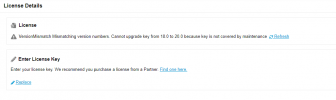
Support advised that we upgrade to v20 to replace a key that had expired, but now i am getting a version mismatch error.
Please help. This is very urgent.
 
Please clarify.
Would a screenshot help to better understand? (Make sure to hide the license key if applicable.)
 
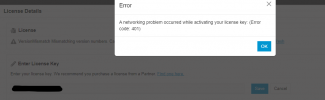
This is the license page, and the error when trying to replace the key
 

Attachments

  • 3CX ERROR.png
    3CX ERROR.png
    15 KB · Views: 6
  • 3cx error1.png
    3cx error1.png
    20.6 KB · Views: 6
This license appears to be a perpetual license without active maintenance.
Is that correct?
Or is this license expired?

What do you see when you check the license on customer.3cx.com portal ?
 
It expired, it was on v18. We purchased a new license as we were downgrading it. Then the new licenses are v20 only.
We couldn't upgrade and apply the new license before expiry unfortunately.
 
Is the new license a key you purchased or a 60-day trial version?
Please note that you cannot replace a paid license key with a free one.
You can only replace an existing activated key with a new license that you have purchased.
 
It is a new license. 8SC.
 
Is the PBX currently on version 20?
Does your network have controls on outbound traffic?
Can the PBX reach the activation server at activate.3cx.com?
Is the FQDN still associated with the old license according to the customer.3cx.com portal?
Has the new license never been activated?
 

Forum statistics

Threads
111,955
Messages
589,925
Members
164,855
Latest member
parik24pro