Video Overview: Meet the 3CX Windows Desktop App

  • Thread starter Thread starter HannaY_3CX
  • Start date Start date
Status
Not open for further replies.
@noord @MidiTélécom ,
If you log into the Management Console and go to "Phones", what version do you see for the "DesktopApp"?
Also yes, @MidiTélécom , I'd also be interested in hearing what Windows version you re running.

Would you happen to have any other Windows installations that are on Windows 10 20H1 (build 19041) to see if you have the same behavior?
 
Which version are you running @MidiTélécom ?
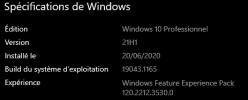
I'm on the last version of Windows :

1630409533709.png

I just check update on my 3CX, all is up to date and I have this version connect to my 3CX :

1630409622929.png
 
  • Like
Reactions: Evolute IT
The blue dot suddenly just appeared and started working....?
Is the Desktop App polling some server over at 3CX HQ and that you have been able to update/refresh anything there? Or is it perhaps using something like Firebase or Apple Push Notifications (but then for Windows of course) that might have had a glitch or something?
I'm just guessing now of course, because suddenly the icon appeared. I did not restart the app or my computer or anything.....


False alarm:

I had one missed phone call AND one missed chat message.
That showed up as a blue badge with the number 2 in it.

If I only have missed chats, there is no badge :)

So when checking the chat-badge, make sure you do NOT have any missed calls as well.
Perhaps that's the case for @NickD_3CX ? Do you ALSO have missed calls as well?
 
  • Like
Reactions: MidiTélécom
@noord
No, no missed calls. Could you also please check the version as well?

@MidiTélécom
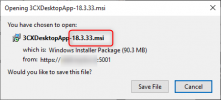
I'm not sure what version of 3CX you are running on the server right now, but you should be seeing 18.3.33 if you are on V18 Final (build 1880).
If you open a WebClient and click on the "Install" button, do you see this version?
1630411374163.png

If yes, please try manually uninstalling the Desktop App and re-installing it with this version.
 
  • Like
Reactions: MidiTélécom
Yes, I'm on build 1880 and desktop version 18.3.33.
I just installed the new desktop app yesterday.

@NickD_3CX
As you requested, I just reinstalled the app and re-provisioned it and now it's working......
I just removed it through control panel, reinstalled from the same setup file I downloaded yesterday and re-provisioned it. Did not reboot the computer in between.....
 
Yes, I'm on build 1880 and desktop version 18.3.33.
I just installed the new desktop app yesterday.

@NickD_3CX
As you requested, I just reinstalled the app and re-provisioned it and now it's working......
I just removed it through control panel, reinstalled from the same setup file I downloaded yesterday and re-provisioned it. Did not reboot the computer in between.....

If it happens again, under the taskbar settings, go to select which icons appear on the taskbar and see if there is a option for the 3cx app. I have a hunch this may be our culprit.
 
If it happens again, under the taskbar settings, go to select which icons appear on the taskbar and see if there is a option for the 3cx app. I have a hunch this may be our culprit.

I'm just glad @MidiTélécom was having the same issue or else it would start to doubt myself :)
 
  • Like
Reactions: MidiTélécom
@noord
No, no missed calls. Could you also please check the version as well?

@MidiTélécom
I'm not sure what version of 3CX you are running on the server right now, but you should be seeing 18.3.33 if you are on V18 Final (build 1880).
If you open a WebClient and click on the "Install" button, do you see this version?
View attachment 24113

If yes, please try manually uninstalling the Desktop App and re-installing it with this version.
I just made the update and now working.
I remember that the app request for a update and made it, so weird that I was not up to date and the app doesn't ask for this update. (I'm on V18 last build)

Great news, It solved !
 
  • Like
Reactions: jed and NickD_3CX
Some of my customers would like to use the application for chat and various info but not for phone calls. Since everyone has a desk phone at their disposal they would not want to see the popup every time a phone call comes in. Is it possible to implement the disabling of the dialer in the windows application?
 
Some of my customers would like to use the application for chat and various info but not for phone calls. Since everyone has a desk phone at their disposal they would not want to see the popup every time a phone call comes in. Is it possible to implement the disabling of the dialer in the windows application?
Why not use it as the phone dialer in CSTA? You can choose to control the phone using the app.
 
Why not use it as the phone dialer in CSTA? You can choose to control the phone using the app.
I would like to use desk phone without the windows application notifying me on every incoming call
 
I would like to use desk phone without the windows application notifying me on every incoming call
That could be great, yes.
But I think with the new Desktop App we solved half the issue, before the window on incoming call was focusing on the dialer, now the dialer isn't focusing so you can continue to type without worries.
 
Can't wait for the Mac version :-)
 
  • Like
Reactions: MidiTélécom
Hi,

sorry for my bad english, hope you will understand well enough.

imo this app is for sure an improvement, its the best between webclient and 3cx software but there is still lot of things missings, things users would appreciate for sure as it can make experience far better :

- its annoying that dialer window is different than main window, why choose this way of doing ? not convenient at all! dialer window could have been displayed inside main window, on bottom for exemple,
- with the same idea, BLF are only visible on dialer window, not main one,
- change group visibility require now 2 clicks instead of one click before on webclient (on the left side), same for webclient by the way, it make experience worse than before! and not only for the one click more but position of group choice is not convenient (top right instead of left)
- to go in contacts list, user have click on the 3 dots then select contact, user cant move contact item to the left (sadly cause there is lot of space). same for everything, user can't move icons to make the display they want, could have been great if possible,
- still this translation error in French who make us believe pre-hook announcement could be possible for an extension, it still not possible to do it in V18 (despite its requested by lot of us), then still need to build a queue for each agent who wants this (then user have no direct control of it, sechedule status or whatever),
- top bar have big empty space, why not use this space to allow admin or user to write something (for exemple : Phone System of Company X),
- still too complex to display a commentary on status which is visible by others extensions, only in settings-> status (why not put this possible when we click on top icon ?)
- this "square" design is ugly compare to "round" design we had before, its not just from me, every user tell us this. Why not let the possibility of choosing design display by user ? with few basics app templates and maybe even better if users or admin can create templates!
- maybe I am not looking at the right place but I can't find hotkey, allowing to call copy directly into dialer an highlighted number.

Yes in France we like to grumble a lot but that's only to show what's need to be improved!
Don't forget that if I'm here its because we still like 3CX, I only think its sad that its far away from perfect.
 
Last edited:
Hi,

sorry for my bad english, hope you will understand well enough.

imo this app is for sure an improvement, its the best between webclient and 3cx software but there is still lot of things missings, things users would appreciate for sure as it can make experience far better :

- its annoying that dialer window is different than main window, why choose this way of doing ? not convenient at all! dialer window could have been displayed inside main window, on bottom for exemple,
- with the same idea, BLF are only visible on dialer window, not main one,
- change group visibility require now 2 clicks instead of one click before on webclient (on the left side), same for webclient by the way, it make experience worse than before! and not only for the one click more but position of group choice is not convenient (top right instead of left)
- to go in contacts list, user have click on the 3 dots then select contact, user cant move contact item to the left (sadly cause there is lot of space). same for everything, user can't move icons to make the display they want, could have been great if possible,
- still this translation error in French who make us believe pre-hook announcement could be possible for an extension, it still not possible to do it in V18 (despite its requested by lot of us), then still need to build a queue for each agent who wants this (then user have no direct control of it, sechedule status or whatever),
- top bar have big empty space, why not use this space to allow admin or user to write something (for exemple : Phone System of Company X),
- still not possible to display a commentary on status which could have been visible by others extensions (like "at home" or something funny or describing the mood like "back and ready to work!",
- this "square" design is ugly compare to "round" design we had before, its not just from me, every user tell us this. Why not let the possibility of choosing design display by user ? with few basics app templates and maybe even better if users or admin can create templates!
- maybe I am not looking at the right place but I can't find hotkey, allowing to call copy directly into dialer an highlighted number.

Yes in France we like to grumble a lot but that's only to show what's need to be improved!
Don't forget that if I'm here its because we still like 3CX, I only think its sad that its far away from perfect.
You litteraly summary all the little things that can be improve for the future of the Desktop App!
 
When installing V18, the old desktop client nor the webclient plugins (chrome, edge) do not get uninstalled. Is it possible to make this automatic, or at least make a good tutorial for users on how they can uninstall it. Because if you don't do that, it opens the old client AND the new client...
 
When installing V18, the old desktop client nor the webclient plugins (chrome, edge) do not get uninstalled. Is it possible to make this automatic, or at least make a good tutorial for users on how they can uninstall it. Because if you don't do that, it opens the old client AND the new client...
Technically speaking, the 2 clients can co-exist on the same machine at the same time (I can even see some users take advantage of this to have 2 different Extensions registered on the same PC....).

Uninstalling instructions for Windows Apps are very very straight forward, and the legacy Windows Client uninstalls the same way any other Windows app does.
I think that this could be a simple email from the admin when they upgrade the 3CX Software and in the same email that is informing them to install the 3CX Desktop App.

We should not do this because we can't assume that EVERYONE will want to uninstall it, some may even prefer for the time being to continue to use the legacy app, which works just fine by the way.
 
  • Like
Reactions: accentlogic
Technically speaking, the 2 clients can co-exist on the same machine at the same time (I can even see some users take advantage of this to have 2 different Extensions registered on the same PC....).

Uninstalling instructions for Windows Apps are very very straight forward, and the legacy Windows Client uninstalls the same way any other Windows app does.
I think that this could be a simple email from the admin when they upgrade the 3CX Software and in the same email that is informing them to install the 3CX Desktop App.

We should not do this because we can't assume that EVERYONE will want to uninstall it, some may even prefer for the time being to continue to use the legacy app, which works just fine by the way.
You have advanced users who know these things??? Lucky you. :)

Another point I just think of. We have lots of users in the meantime that are connected to intune and they are not admin of the machine. So they even can't install the 3CX windows app as they have no rights.... Is there a deployment available I can use in intune?
 
Status
Not open for further replies.

Forum statistics

Threads
111,992
Messages
590,171
Members
164,931
Latest member
admintest