Video stream from Fanvil i63 doesn't work

Status
Not open for further replies.

bytesolutions

Bronze Partner
Advanced Certified
Joined
May 30, 2016
Messages
80
Reaction score
10
Good morning.
I have a configuration like this:
- 3CX 18.0 update 7
- Fanvil i63 with firmware version 2.4.4 (downloaded from 3cx.com/support)
When someone rings on the intercom, I would like to be able to view the video stream on my smartphone to see who rang.
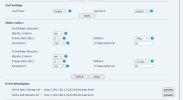
I know the 3CX Mobile App doesn't support H264 stream but I tried to use Zoiper by purchasing the H264 codec, but the video stream is not there.
Is there any setting to enable on the Fanvil i63?
Thank you all
 

Attachments

  • Video Codecs.jpg
    Video Codecs.jpg
    33.5 KB · Views: 39
Hi @bytesolutions

While we cannot help you when it comes to 3rd party apps, we can at least say the following:


Is there any setting to enable on the Fanvil i63?

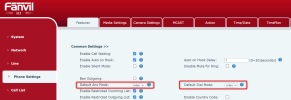
By default, the i63 does offer video which works when testing with 3CX desktop apps and webclient. This can be confirmed when inspecting the SIP invites coming from the device, and is also selectable in the web UI:
1684238168204.png


I know the 3CX Mobile App doesn't support H264 stream

We are planning on adding H264 to our mobile apps soon!


PS: factory reset and reprovision to get the i63 defaults in case you changed settings during testing.
 
Hi @bytesolutions

While we cannot help you when it comes to 3rd party apps, we can at least say the following:


By default, the i63 does offer video which works when testing with 3CX desktop apps and webclient. This can be confirmed when inspecting the SIP invites coming from the device, and is also selectable in the web UI:
View attachment 35516


We are planning on adding H264 to our mobile apps soon!


PS: factory reset and reprovision to get the i63 defaults in case you changed settings during testing.
Good morning JohnS
Thank you so much for your answer. I reset the intercom to the factory configurations and I did the provisioning from 3CX console and now the video calls with a local webclient work perfectly, using the 3CX app for iPhone from an external network the audio works but not the video stream. I press the video button but it stays black. Port 5090 on the firewall is open. Does the video stream need dedicated ports?
Thank you
Simon
 
Hi Simon,

Not it does not need any special ports if you use an SBC everything is done automatically.

Which iPhone app are you using currently, are you on the Test flight app?
 
Hi Simon,

Not it does not need any special ports if you use an SBC everything is done automatically.

Which iPhone app are you using currently, are you on the Test flight app?
Hi JohnS
I'm carrying out further tests right now on two different systems but with the same intercom and the same version of 3CX and these are the results I found:
- webclient connected to the same LAN as the intercom (3cx on premise) - video stream WORKS
- webclient connected to external network (3CX on premise) - video stream DOES NOT WORK
- 3CX App for iOs or Android connected to the same LAN network as the intercom (3cx on premise - video stream NOT WORKING
- 3CX App for iOS or Android connected to external network (3CX on premise) - video stream NOT WORKING
Android app version: 18.1.3.135
iOs app version: 18.6.2.550
I'm not using test flight app

Thank you
 
The Android / iOS apps do not yet support H264, the video will not work there, so this is expected (coming later).

- webclient connected to the same LAN as the intercom (3cx on premise) - video stream WORKS
- webclient connected to external network (3CX on premise) - video stream DOES NOT WORK
This depends on your network to a point - if local traffic is fine but remote is not then it could be down to the network fragmenting the video packets too much after they leave the network and are on their way to the remote client. They probably arrive at the remote webclient but they may be too mangled to decode properly and show on screen. We have seen this in some cases.

Are you able to adjust your MTU settings to reduce the packet size a bit while troubleshooting?
 
The Android / iOS apps do not yet support H264, the video will not work there, so this is expected (coming later).


This depends on your network to a point - if local traffic is fine but remote is not then it could be down to the network fragmenting the video packets too much after they leave the network and are on their way to the remote client. They probably arrive at the remote webclient but they may be too mangled to decode properly and show on screen. We have seen this in some cases.

Are you able to adjust your MTU settings to reduce the packet size a bit while troubleshooting?
I can adjust the pppoe mtu value of the connection in the modem. It is currently 1492 and from the tests I have done there is no fragmentation.
The problem is that on the 3cx mobile app it doesn't even work locally
 
The mobile app should work for audio only.

Are you able to get audio connected at least?
 
The mobile app should work for audio only.

Are you able to get audio connected at least?
yes, audio always works correctly, both inside and offside the LAN. But the video doesn't work, and I really need this function
 
Alright, just to clarify this again:

3CX Android / iOS apps = these only do audio for now. Video is not available

3CX Desktop App / Webclient = these can do both audio and video.

So to sum it up, the only unexpected issue you have now is a remote Webclient having audio, but not video correct?

If this is the only remaining unexpected error, it may be down to the MTU as mentioned earlier.
That's why I asked whether you had the ability to adjust it a bit and play around with it to see if you can get video through.
It could also be some third issue that we have not touched upon yet.
 
ok perfect, now everything is clearer to me. The 3cx Mobile Apps do not support video features... Sin
Do you know or can you recommend a mobile app that supports this feature? For example Zoiper?
 
ok perfect, now everything is clearer to me. The 3cx Mobile Apps do not support video features... Sin
Do you know or can you recommend a mobile app that supports this feature? For example Zoiper?
Mobile video is coming soon. It's in the development version already.

But any app that can do H.264 video
 
Alright, just to clarify this again:

3CX Android / iOS apps = these only do audio for now. Video is not available

3CX Desktop App / Webclient = these can do both audio and video.

So to sum it up, the only unexpected issue you have now is a remote Webclient having audio, but not video correct?

If this is the only remaining unexpected error, it may be down to the MTU as mentioned earlier.
That's why I asked whether you had the ability to adjust it a bit and play around with it to see if you can get video through.
It could also be some third issue that we have not touched upon yet.
Good morning.
I'm still having problems making external video calls from the webclient. Audio works fine, the video pop-up opens but I don't see anything. Currently the MTU of the modem is 1492. The only MTU value I need to change is the one on the PppoE of the modem I guess. MTU tests show that 1492 is correct. Do I have to lower it further?
 
Good morning.
I managed to get the Alpha version of the new 3CX App under development, the version that integrates H264 support. Indeed now the H264 stream works, but not always; sometimes the video stream opens fine after a couple of seconds, other times after 5-8 seconds, other times it doesn't open at all and only the audio stream works.
I did some tests and to make it work better I had to lower the MTU value from 1492 to 1476.
Overall I would say successful goal, hoping that future releases of the App will solve the small delay problems in opening the video stream
Thank you all
 
Status
Not open for further replies.

Members Online Now

Forum statistics

Threads
111,835
Messages
589,289
Members
164,666
Latest member
infinititravels