VMail replaced by Voicemail Box

Status
Not open for further replies.

GedPerryman

Silver Partner
Basic Certified
Joined
Feb 2, 2023
Messages
26
Reaction score
2
Call is answered by IVR 858 and plays a message.
Option 2 is pressed and call is forwarded to RG 805
If there is no answer on IVR 805 it is set to forward forwards to IVR 859 which plays an additional message before forwarding to VM 805
805 receives message and forwards it via email to managers.

Randomly (happened on previous occasions) when VM 805 receives the call from 858message, it will forward the call to VMail 100.

Can anyone shed any light on what might cause this? It only seems to be happening since the upgrade from V18 to V20. We're 3CX hosted. All nos. in the chain are set to ignore office hours.
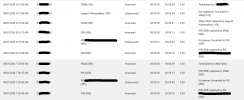
Screenshot attached shows the call working as expected at 7:30 this morning and then not working at 8:!6.

TIA
 

Attachments

  • Voicemail.png
    Voicemail.png
    65.2 KB · Views: 23
Do you have access to the 3CX Activity Log (Verbose setting)? If so, that's where I'd be looking, for a clue, as to what's happening.
 
Call is answered by IVR 858 and plays a message.
Option 2 is pressed and call is forwarded to RG 805
If there is no answer on IVR 805 it is set to forward forwards to IVR 859 which plays an additional message before forwarding to VM 805
805 receives message and forwards it via email to managers.

Randomly (happened on previous occasions) when VM 805 receives the call from 858message, it will forward the call to VMail 100.

Can anyone shed any light on what might cause this? It only seems to be happening since the upgrade from V18 to V20. We're 3CX hosted. All nos. in the chain are set to ignore office hours.
Screenshot attached shows the call working as expected at 7:30 this morning and then not working at 8:!6.

TIA
I take it that extension 100 is the operator extension; is this correct? You can see this from the admin console > System > Options > Operator Extension section.

So that happens here while a caller is listening to the vmail greeting being played for the VM of ext 805. they press *, thus transferred to the operator's extesnion, which is nto registered with an endpoint and so ends up in the mail of 100.

Your next question will be how to disable this. The answer is that you can not, as the option to press * is set in the system by design and can not be changed.
 
Last edited:
If you don't currently use extension 100, and it is the operator, forward it to an IVR that allows that caller some options as to where their call goes. You could have the IVR immediately send it to VM 805, but, anyone on the PBX pressing * will route there, so that destination may not be appropriate for all callers.
 
Hello,

As @Charles_3CX mentioned, it's not possible to disable the * key in voicemail boxes.
That said, I can share a "hack"/workaround with you—though I must warn you, it’s not perfect, but it could help mitigate the issue.

If you create a dummy extension and set all the no-answer rules to "Busy/EndCall" without voicemail, then assign it as the operator, the system will attempt to transfer the call. The user will be notified that the transfer failed because the operator is busy, and the caller will be returned to the voicemail before the transfer attempt.

Now, of course, this is a "hack/workaround" function, and no one can guarantee it will keep working over time (with future updates). Imagine a scenario where, eventually, my tweak stops working, and users who press * end up getting disconnected. So, if you choose to go with this "hack/workaround", be aware that the behavior isn't guaranteed, and you should monitor it with each update. Obviously, 3CX wouldn’t be able to support you if my "hack/workaround" stops working.
That’s the very definition of a "hack/workaround".

Don’t tell @Charles_3CX :p from 3CX, or he’ll send the "3CX S.W.A.T. team" after me for sharing an unsupported and unreliable solution (I admit it).
 
  • Haha
Reactions: Charles_3CX
Thanks for your answers. I've tested pressing * and it demonstrates this behaviour and is reported exactly as you've suggested in the logs and redirects to VMail 100 as you predicted. It is most likely this is the cause. Fortunately I think we can live with this in this instance - but your workaround is useful to know. Thank you all for your responses.
 
  • Like
Reactions: Charles_3CX
Status
Not open for further replies.

Forum statistics

Threads
111,973
Messages
590,070
Members
164,891
Latest member
esmo