Voicemail issues

Status
Not open for further replies.

cparker004

Forum User
Basic Certified
Joined
Apr 2, 2020
Messages
16
Reaction score
0
My client has asked to me enable voicemail as email attachment. So his workers can check it from home. He currently has standard version.
I have two issues
Issue one the same 3 voice mails keeps getting sent over and over to email. the voicemails are 2 min of single beeping
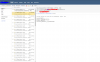
Issue two how to change the prompt for after hours calling it isnt going to voicemail. i set up
 

Attachments

  • example.PNG
    example.PNG
    95.7 KB · Views: 10
Issue one the same 3 voice mails keeps getting sent over and over to email. the voicemails are 2 min of single beeping
The beeping (disconnect tone?) issue causes me to suspect that your trunk is not disconnecting when the calling party hangs up. Do you use SIP trunks, or a gateway (PSTN?). If it is a gateway, then the disconnect Method is probably not set correctly. An email should be sent only when a new voicemail has been left.

Issue two how to change the prompt for after hours calling it isnt going to voicemail. i set up
And how are you doing this...using the office hours, and forwarding of a set, or of the system? More information required.
Have you checked the 3CX Activity Log to see why the calls are going where they do?
 
The beeping (disconnect tone?) issue causes me to suspect that your trunk is not disconnecting when the calling party hangs up. Do you use SIP trunks, or a gateway (PSTN?). If it is a gateway, then the disconnect Method is probably not set correctly. An email should be sent only when a new voicemail has been left.


And how are you doing this...using the office hours, and forwarding of a set, or of the system? More information required.
Have you checked the 3CX Activity Log to see why the calls are going where they do?

Using a Sip Trunk with specific office hours, from 8am to 5pm calls are routed to the call que. After hours its routed to a night time call center.

the error i see over and over at night.

Y.Y.Y.Y= customer public ip

04/02/2020 4:03:00 AM - [CM102001]: Authentication failed for AuthFail Recv Req REGISTER from 185.157.212.8:50892 tid=313300439 Call-ID=1993234272-643323686-42035981: REGISTER sip:Y.Y.Y.Y SIP/2.0 Via: SIP/2.0/UDP 100.64.36.15:50892;branch=z9hG4bK313300439;received=185.147.212.8 Max-Forwards: 70 Contact: <sip:[email protected]:50892> To: <sip:[email protected]> From: <sip:[email protected]>;tag=1834446918 Call-ID: 1993234272-643323686-42035981 CSeq: 2 REGISTER Proxy-Authorization: Digest username="6646",uri="sip:Y.Y.Y.Y",algorithm=X.X.X,realm="3CXPhoneSystem",nonce="414d535c1496495353:07052912b3ed7d8c5e315e13529bd2a8",response="261e2a3ff640a839039871c017df78d5" User-Agent: Avaya IP Phone 1120E Content-Length: 0 ; Reason: Credentials don't match, check that authorization-ID and password match the ones in extension settings
 
After OH set an IVR with no choice , with audio message you want and then forward to a VM
 
04/02/2020 4:03:00 AM - [CM102001]: Authentication failed for AuthFail Recv Req REGISTER from 185.157.212.8:50892 tid=313300439 Call-ID=1993234272-643323686-42035981: REGISTER sip:Y.Y.Y.Y SIP/2.0 Via: SIP/2.0/UDP 100.64.36.15:50892;branch=z9hG4bK313300439;received=185.147.212.8 Max-Forwards: 70 Contact: <sip:[email protected]:50892> To: <sip:[email protected]> From: <sip:[email protected]>;tag=1834446918 Call-ID: 1993234272-643323686-42035981 CSeq: 2 REGISTER Proxy-Authorization: Digest username="6646",uri="sip:Y.Y.Y.Y",algorithm=X.X.X,realm="3CXPhoneSystem",nonce="414d535c1496495353:07052912b3ed7d8c5e315e13529bd2a8",response="261e2a3ff640a839039871c017df78d5" User-Agent: Avaya IP Phone 1120E Content-Length: 0 ; Reason: Credentials don't match, check that authorization-ID and password match the ones in extension settings
Do you have your pbx IP blacklist increasing with hack attempts?
 
Client has two sip trunk one for his employees to call, the other for his customers.
 
Client has two sip trunk one for his employees to call, the other for his customers.
So what is the question ? how to set IVR only on customer trunk side ?
 
Do you recognise this extension number and IP? [email protected] Do you use Avaya IP Phone 1120E phones? If no, then it is a hack attempt at registration, and generally 3CX will shut them out after too many from one IP. Are the logs all from the same IP or range?

If you do recognise them, then that extension would seem to have a configuration issue.
 
So what is the question ? how to set IVR only on customer trunk side ?
Customer wants Voicemail messages sent to email as attachment..
The same 3 VM messages keep getting sent to over and over. the message is just 2 min of a single beep every ten seconds. How can i stop this?

Second the audio recording for after hours doesnt have the correct message where do i go to change it?
 
Do you recognise this extension number and IP? [email protected] Do you use Avaya IP Phone 1120E phones? If no, then it is a hack attempt at registration, and generally 3CX will shut them out after too many from one IP. Are the logs all from the same IP or range?

If you do recognise them, then that extension would seem to have a configuration issue.
Negative the client doesnt have that brand. Yes Same ip over and over. It gets blacksited then try again after lock out is up
 
Negative the client doesnt have that brand. Yes Same ip over and over. It gets blacksited then try again after lock out is up
Then edit the blacklist and change the expiry year to 2040
Also a good idea to extend the blacklist time to a week or so.
 
  • Like
Reactions: cparker004
Second the audio recording for after hours doesnt have the correct message where do i go to change it?
see in trunk which ivr extension or vm is used for OOH and then edit for audio change.
 
  • Like
Reactions: cparker004
Then edit the blacklist and change the expiry year to 2040
Also a good idea to extend the blacklist time to a week or so.
Thank you i did that for both ip and number. I thought i mis-configured something but is was a fax line number that keeps calling over and over again leaving the beep voicemail.
 
Then edit the blacklist and change the expiry year to 2040
Also a good idea to extend the blacklist time to a week or so.
Ive tried blocking the number but im still getting email the voice mail attachment
 

Attachments

  • Number needing block.PNG
    Number needing block.PNG
    44 KB · Views: 3
  • Blocking not working.PNG
    Blocking not working.PNG
    19.6 KB · Views: 2
Last edited:
That's strange, any numbers that I have blacklisted don't go anywhere.
Are they dialling a DID number? Maybe... call forward based on caller ID?
 
That's strange, any numbers that I have blacklisted don't go anywhere.
Are they dialling a DID number? Maybe... call forward based on caller ID?
When I block my number it is still able to connect to 2nd SIP trunk. How can i block a number from calling any number attached to client 3cx
 
Status
Not open for further replies.

Forum statistics

Threads
111,941
Messages
589,856
Members
164,832
Latest member
Boblatino