- Joined
- Aug 27, 2023
- Messages
- 7
- Reaction score
- 1
I have a 16SC Pro configured in Multi Tenant mode hosted by 3cx.
I'll be using it for 4 small clients.
I added the first client, and configured the Trunk which is FlowRoute.
I'm trying to add Flowroute for the second client, and when I try to add it, the entire 'VoIP Provider Tested' section of the dropdown is missing.
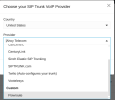
Here is a picture of my options. You can see that I already have FlowRoute in there for the first client.
I can't seem to add another FlowRoute trunk for the 2nd client.
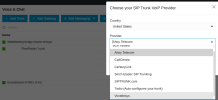
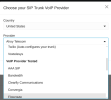
Here is the option in one of my other Non-Multi-Tenant deployments:
I'll be using it for 4 small clients.
I added the first client, and configured the Trunk which is FlowRoute.
I'm trying to add Flowroute for the second client, and when I try to add it, the entire 'VoIP Provider Tested' section of the dropdown is missing.
Here is a picture of my options. You can see that I already have FlowRoute in there for the first client.
I can't seem to add another FlowRoute trunk for the 2nd client.
Here is the option in one of my other Non-Multi-Tenant deployments: