VoIP Provider Tested list missing in Multi-Tenant mode?

brian@sohonetworksolution

Silver Partner
Joined
Aug 27, 2023
Messages
7
Reaction score
2
I have a 16SC Pro configured in Multi Tenant mode hosted by 3cx.
I'll be using it for 4 small clients.
I added the first client, and configured the Trunk which is FlowRoute.
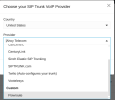
I'm trying to add Flowroute for the second client, and when I try to add it, the entire 'VoIP Provider Tested' section of the dropdown is missing.

Here is a picture of my options. You can see that I already have FlowRoute in there for the first client.
I can't seem to add another FlowRoute trunk for the 2nd client.
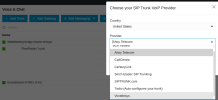
1794942139985.png

Here is the option in one of my other Non-Multi-Tenant deployments:
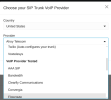
1794942018783.png
 
Solution
Did you find a solution to this? We are seeing the same issue on our 3CX multitenants - seems to be an issue since V20 Update 10.
Yes, what worked for me, as suggested by the tech that worked my support ticket:
Navigate to Admin > Advanced > Templates > Provider Templates, and create a copy of the Flowroute's default template, and proceed by replacing:
<templatetype>supported</templatetype>
With
<templatetype>preferred</templatetype>
Save the template. Then the provider will appear directly when creating new trunks.
I named mine "flowroute-MultiTenant".
Now FlowRoute appears in the list under Custom:
1795052864194.png

Here you can see my original Trunk using the Built-In Template, and the new one below it.
1795053013168.png

Was very happy...
Can you please open a ticket with us for 3CX technical support?
 
Did you find a solution to this? We are seeing the same issue on our 3CX multitenants - seems to be an issue since V20 Update 10.
 
Did you find a solution to this? We are seeing the same issue on our 3CX multitenants - seems to be an issue since V20 Update 10.
Yes, what worked for me, as suggested by the tech that worked my support ticket:
Navigate to Admin > Advanced > Templates > Provider Templates, and create a copy of the Flowroute's default template, and proceed by replacing:
<templatetype>supported</templatetype>
With
<templatetype>preferred</templatetype>
Save the template. Then the provider will appear directly when creating new trunks.
I named mine "flowroute-MultiTenant".
Now FlowRoute appears in the list under Custom:
1795052864194.png

Here you can see my original Trunk using the Built-In Template, and the new one below it.
1795053013168.png

Was very happy to get that one solved.
Hope it helps you too.
 
  • Like
Reactions: TheodorosG_3CX
Solution

Forum statistics

Threads
112,562
Messages
593,316
Members
165,780
Latest member
youwillbrun