Solved VoIP - Quality Monitor in V20 , Where i can find this future

Status
Not open for further replies.

Frank-Buhse

Bronze Partner
Advanced Certified
Joined
Jan 17, 2024
Messages
2
Reaction score
1
Hi
VoIP - Quality Monitor in V20 , Where i can find this future.
Thanks for your support.
 
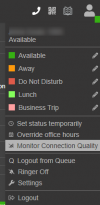
In your Web Client select the option to monitor the extension and set the duration:
1705483164859.png

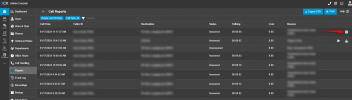
No matter for how long this will continue, you can check for each call the connection quality. Simple go to the Reports and press on the Call Log. On the right there is button as per below screenshot:
1705483325667.png

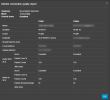
This will give you all the connection information:


1705483386330.png
 
OK. Thank you for your effort
 
  • Like
Reactions: N_G
You are welcome ;)
 
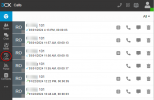
1709818881778.png
Our Version 20.0 Update 0 (Build 1620 Release)
has no "button" on the right hand side of the screen
 
@dragandincic
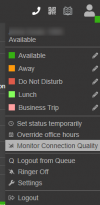
If you click in the status bar, dont you have the option Monitor Connection Quality?
Once you enable it, only after the call you should see the outcome in the call history, and for your extension
1709819287214.png
 
@dragandincic
If you click in the status bar, dont you have the option Monitor Connection Quality?
Once you enable it, only after the call you should see the outcome in the call history, and for your extension
View attachment 40164
Yes, I do, and I have added couple of extensions to be monitored for 1 day. After that I made few calls as it can be seen on my screenshot - but no button on the right hand side on call report
 
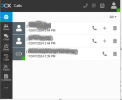
Neither if you click in the Calls category on the right side?
1709820654712.png
 
Should you open support ticket with us so we can have a look at your settings and then advise?

Thank you
 
Should you open support ticket with us so we can have a look at your settings and then advise?

Thank you
The issue seems to have been with one extension only - we have tested on other extensions and now we see no issue, it is showing the reports. thank you for you help
 
To be honest is not something common and something that I could neither reproduce from my end.
If you retrigger even by disabling "Monitor connection quality" and enabling again on that extension, does it make any difference?
 
To be honest is not something common and something that I could neither reproduce from my end.
If you retrigger even by disabling "Monitor connection quality" and enabling again on that extension, does it make any difference?
Oleg, There has been no issue since, we can close the tread
 
Excellent! Thank you for the feedback too.
Have a nice day
 
Status
Not open for further replies.

Latest Posts

Forum statistics

Threads
111,953
Messages
589,916
Members
164,851
Latest member
DrunkeMeister